
What Does Dropshipping Auto Fulfillment Really Automate?
 Written by Sam XiaPublished
Automated dropshipping fulfillment is often presented as a hands-off way to process orders. For sellers, the appeal is simple: spend less time managing purchasing, fulfillment, and shipping, and more time running the store and making sales.
In practice, “automated” can describe very different levels of service. Some providers only transfer order data. Others also handle purchasing, quality inspection, packing, shipping, tracking, and delivery issues. The important question is not whether people work behind the scenes. It is how much of the backend the seller still needs to manage.
This guide explains what dropshipping auto fulfillment can automate, how preset rules shape the workflow, and when a decision still needs human judgment. It then shows how ZQ combines system automation with team-managed fulfillment, allowing sellers to keep selected approvals or hand over the backend process.
Table of contents
- Does Fully Automated Dropshipping Fulfillment Exist?
- What Can Dropshipping Auto Fulfillment Automate?
- What Still Needs a Seller or Service Agent?
- Full, Semi-Automated, and Agent-Managed Fulfillment
- How ZQ Helps Manage Orders and Fulfillment
- The Benefits and Limits of Each ZQ Workflow
- How to Choose the Right Level of Control
- Frequently Asked Questions
- Does full automation mean no people are involved?
- What is semi-automated dropshipping fulfillment?
- Is agent-managed fulfillment a form of automation?
- Can ZQ Dropshipping place and manage orders for a seller?
- Can a seller keep payment manual and choose a QC level?
- Does ZQ Dropshipping return tracking information?
Does Fully Automated Dropshipping Fulfillment Exist?
Yes, but only within a defined workflow. For the seller, a standard order can move through configured steps without manual data entry.
The seller first connects a store and lists products through ZQ. When a customer orders, the complete order details sync back to ZQ automatically. This includes the product, variation, quantity, and shipping address. The seller does not need to enter that information again.
For each new store SKU, the seller first matches the SKU in ZQ to the product and supplier they have selected. Once the match is saved, future orders for that same SKU reuse it and move through the workflow automatically. If an order falls outside the saved rules, an authorized service agent handles it or asks the seller for a decision.
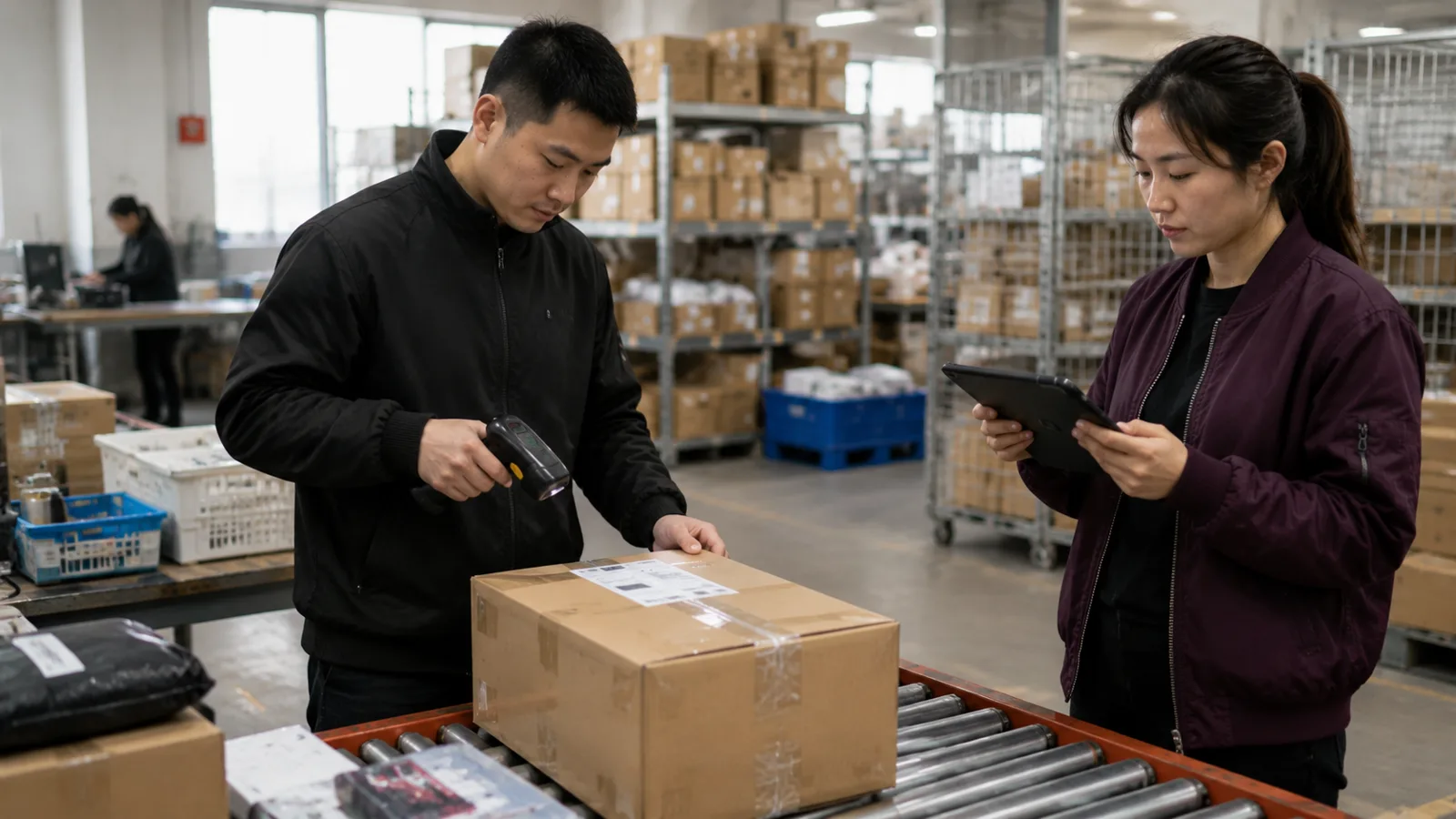
ZQ operates fulfillment facilities in China, the United States, and South Korea. These locations allow the ZQ team to receive, store, process, and dispatch products for cross-border orders to the seller’s destination markets.
This does not mean the fulfillment process is people-free. The ZQ team performs the backend work, while the service agent follows up on operational and shipping exceptions. The seller needs to step in when there is an order exception, price change, purchasing adjustment, or another matter that requires the seller's review or approval.
The meaning can vary by provider. Some services call order placement and tracking sync “full automation.” Others use the term when inventory is already stored in a fulfillment warehouse and orders route there automatically.
This is why sellers should ask a more specific question:
- Does the system only sync order data?
- Does it place the supplier order?
- Is payment automatic or manual?
- Does it trigger warehouse fulfillment?
- Does it return tracking information?
- What happens when stock, cost, or product details change?
An automation claim is useful only when the provider defines its starting point, ending point, and exception process.
What Can Dropshipping Auto Fulfillment Automate?
Automation is strongest at moving accurate information through repeatable steps. It saves time when the product, supplier, cost, and fulfillment rules are already stable.
Once the store is connected and products are listed through ZQ, the workflow may automate:
- Syncing the complete customer order from the seller's store
- Reading the product, variation, quantity, and shipping address from the synced order
- Reusing the saved ZQ match for future orders of the same SKU
- Applying the saved QC, packaging, warehouse, and shipping rules
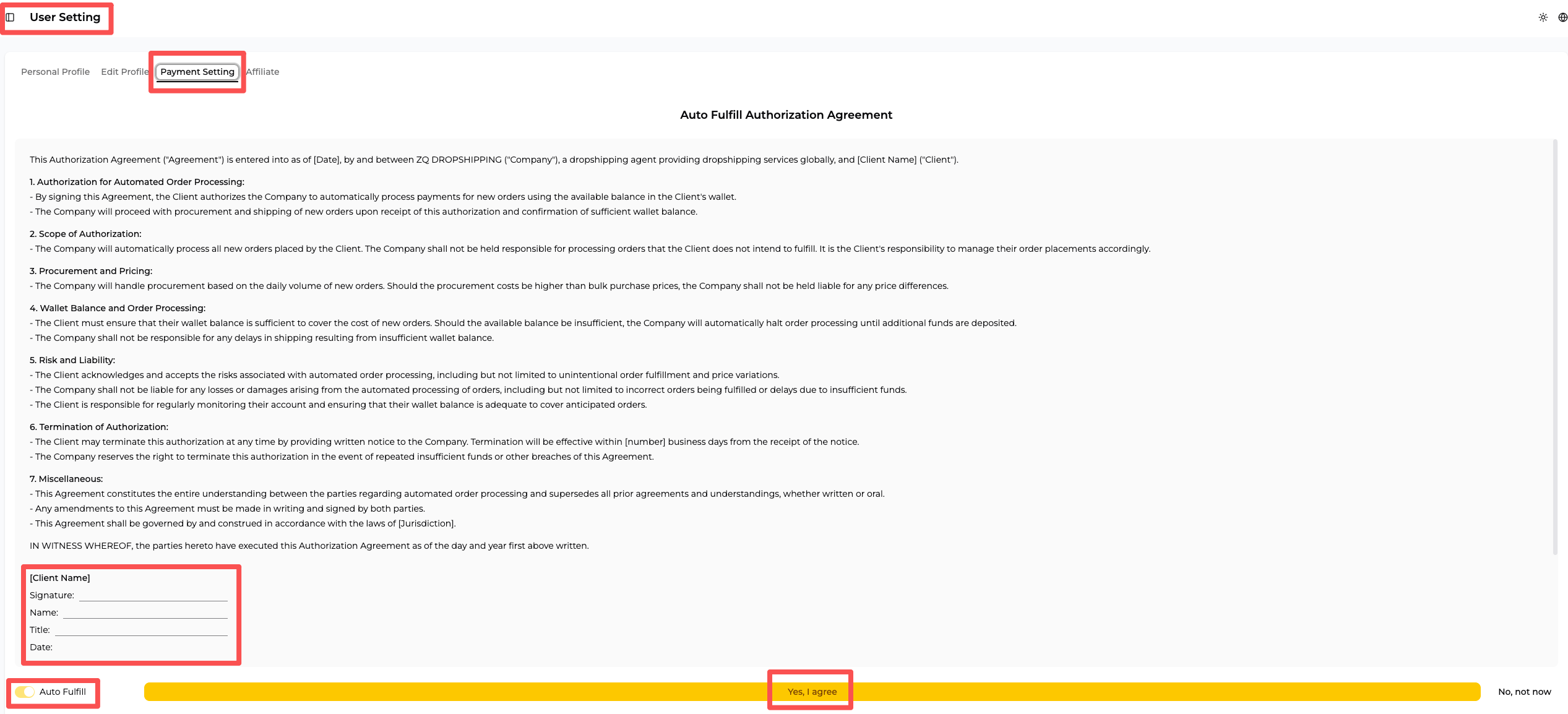
- Purchasing automatically when Auto-Fulfill is enabled and the account has enough balance
- Updating processing and shipment status
- Returning tracking information to the seller's store
Order sync and purchasing payment are separate steps. The selected payment mode controls what happens after the order arrives in ZQ.
With manual payment, the seller pays for the synced order before ZQ purchases and fulfills it. With Auto-Fulfill enabled and enough account balance, ZQ purchases and fulfills the order automatically.
Manual payment does not require the seller to re-enter the order. It is a chosen payment checkpoint, not an order-sync exception.
What Still Needs a Seller or Service Agent?
A new decision is needed only when the system cannot apply a saved rule or approved limit. A change alone does not make an order an exception.
| Set once or update when needed | What the system does for each order | When the workflow pauses |
|---|---|---|
| SKU match | Reuses the saved product and supplier match for future orders of the same SKU | A new SKU has not yet been matched in ZQ |
| Supplier or warehouse routing | Routes the order using saved stock and destination rules | No approved source can fulfill the order |
| Payment mode | Waits for manual payment or uses Auto-Fulfill when enabled and the balance is sufficient | Manual payment is pending or the balance is insufficient |
| QC level | Applies the saved QC level to each order. Free QC is the default unless the seller selects Basic QC or another option | The inspection finds an issue that needs a decision |
| Branded packaging | Applies the saved packaging setup | The request falls outside the saved setup |
| Address and shipping rules | Uses the latest synced address and selects an approved route | The address is incomplete, unserviceable, or has no approved route |
| Stockout and replacement rules | Uses a pre-approved replacement when allowed | No approved replacement is available |
If stock, purchasing cost, or shipping conditions change, ZQ first checks the seller’s saved instructions. An authorized service agent can handle the case within the agreed limits. If neither applies, ZQ asks the seller what to do.
Saved branded packaging and QC settings apply to each order. Free QC is the default. If the seller selects Basic QC or another option in the system, ZQ uses that level for later orders until the setting changes. Warehouse staff still perform the inspection, but the seller does not need to select the level again for every order.
When no approved rule gives a clear next step, the case goes to an authorized service agent or the seller. Only decisions outside the agent's agreed authority must return to the seller.
Full, Semi-Automated, and Agent-Managed Fulfillment
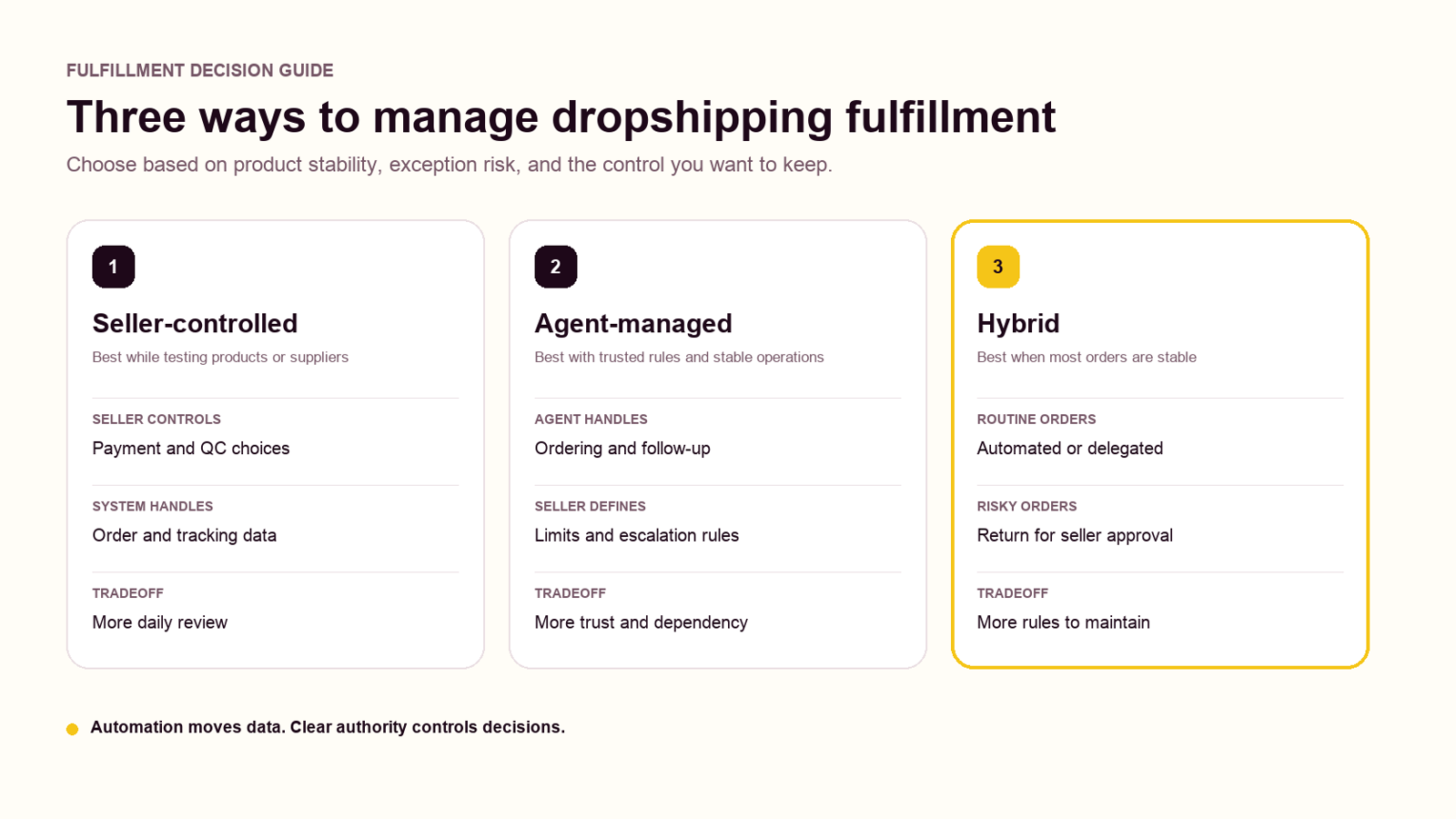
These terms describe different parts of the operating model. Automation describes what the system does. Agent management describes who handles operational work and exceptions.
| Fulfillment model | What happens automatically | Who places or approves orders | Who handles exceptions | Main tradeoff |
|---|---|---|---|---|
| Rules-based full automation | Standard orders move through all configured steps | System follows approved payment and order rules | Seller, provider, or exception team | Lowest routine workload, highest need for stable setup |
| Seller-controlled semi-automation | Orders and logistics information sync | Seller pays manually and chooses the QC level or selected exception approvals | Seller with support from the provider | More control, but more daily work |
| Agent-managed fulfillment | Order and logistics data sync automatically | Authorized service agent handles agreed order tasks | Agent resolves or escalates under agreed rules | Less seller workload, but greater dependence on trust and reporting |
| Hybrid fulfillment | Routine data and approved orders move automatically | Seller keeps selected high-risk approvals | Agent handles routine exceptions and escalates defined cases | Balanced control, but rules must stay clear |
“Fully managed” is not the same as “fully automated.” Fully managed means the seller has delegated the work. A person may still be placing orders, contacting suppliers, reviewing QC, or resolving problems behind the scenes.
Semi-automated fulfillment means order data moves automatically while the seller keeps selected controls. For example, the seller may pay each order manually, choose the QC level in advance, or require approval for certain substitutions.
The labels matter less than the actual responsibility map. Sellers should confirm what the system does, what the agent may do, and what must return for approval.
How ZQ Helps Manage Orders and Fulfillment
In ZQ’s workflow, the system moves order and logistics data, applies saved settings, and returns tracking information to the store. Through ZQ’s order fulfillment service, the team performs the backend work, including purchasing, supplier communication, QC, packing, shipping, customs documentation, parcel tracking, and exception follow-up.
The seller controls the payment mode and approval boundaries. Payment can remain manual or run through Auto-Fulfill. Free QC applies by default, while another QC level can be selected in the system. The seller can also authorize a service agent to manage agreed decisions and follow-up work.
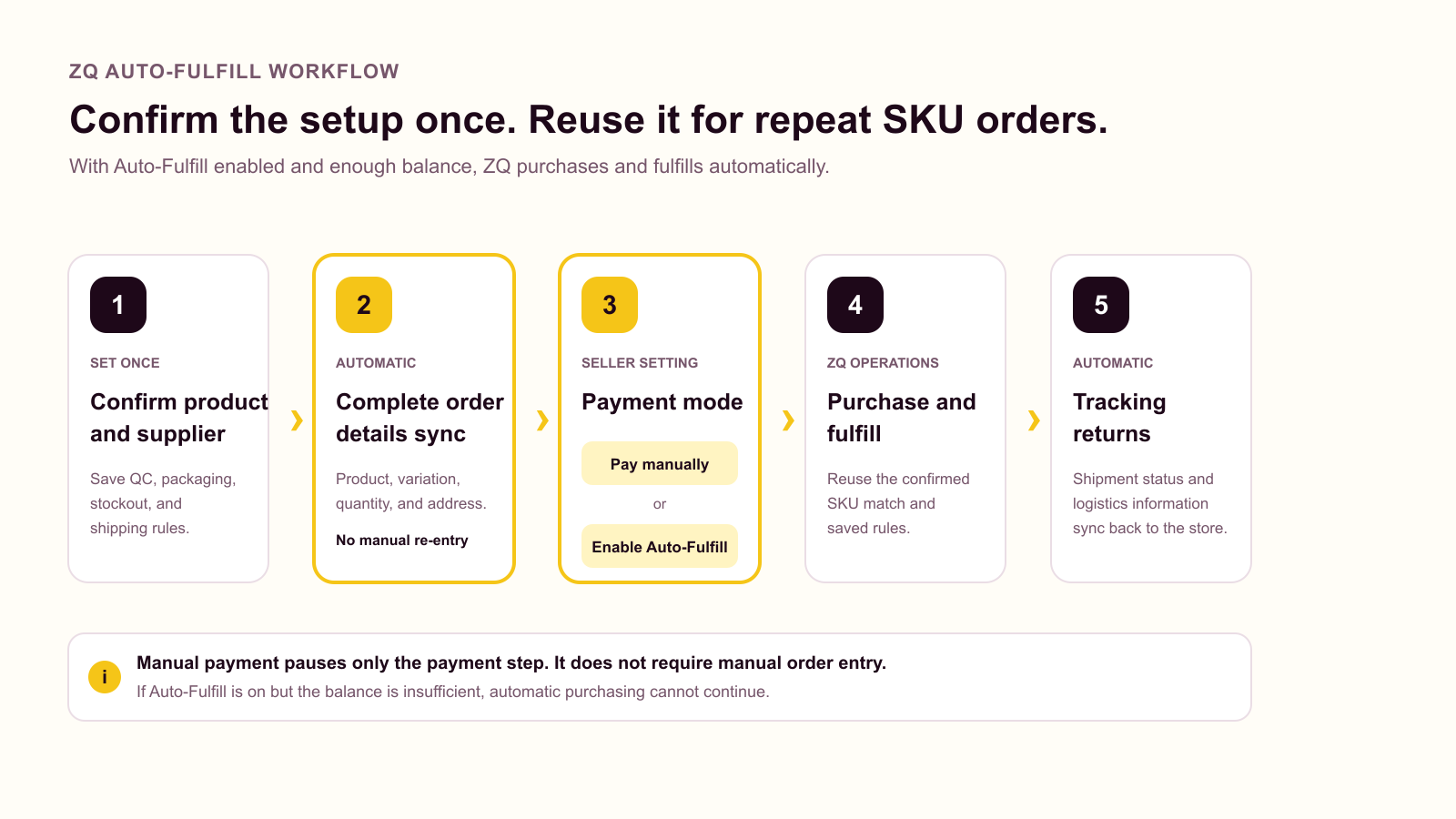
The basic flow is:
- The seller connects the store and lists products through ZQ.
- For each new store SKU, the seller chooses a product and supplier, then saves that match in ZQ.
- Complete customer order details sync back to ZQ automatically.
- The seller pays manually, or Auto-Fulfill uses the available balance when enabled.
- The system applies the saved product, QC, packaging, stockout, and shipping rules.
- ZQ purchases the goods and fulfills the order.
- Logistics information returns to the seller's store after shipment.
Once a SKU match is saved, future orders for that same SKU can reuse it. Order transfer remains automatic in either payment mode. With manual payment, ZQ waits for the seller to pay. With Auto-Fulfill authorized and enough balance, ZQ can purchase and fulfill the order automatically.
Seller-controlled semi-automation
In this setup, complete order and logistics information sync automatically, but the seller pays each order manually. The seller also chooses a QC level in the system. Free QC applies by default unless the seller selects Basic QC or another option.
This gives the seller direct control over spending and product risk. It works well during product testing or when costs and specifications change often.
The disadvantage is daily workload. Orders may wait until the seller reviews them, and time-zone differences can delay approval.
ZQ service agent management
A seller can authorize a ZQ service agent to place and manage orders on the seller's behalf. This is managed fulfillment, not purely software-driven automation.
Before routine orders begin, the seller and agent should agree on:
- The product and supplier the seller chose for each new SKU match
- Which QC level should apply to orders
- Stockout and product replacement rules
- Custom packaging requirements
- Special cases that must return to the seller for approval
- Data reporting, reconciliation, and record-retention requirements
The agent can then manage approved routine work and follow up with suppliers. Decisions outside the agreed scope return to the seller.
A hybrid ZQ workflow
A hybrid workflow combines system automation, agent support, and seller approval. It is often practical for stores with stable repeat products and occasional higher-risk orders.
For example:
- Orders for a matched SKU reuse the saved match
- Order and logistics information sync through the system
- The saved QC level and packaging settings apply
- The service agent handles cases within the agreed limits
- ZQ asks the seller when no saved instruction or agent authority covers the case
This keeps routine orders moving while reserving specific decisions for the seller.
The Benefits and Limits of Each ZQ Workflow
Each workflow solves a different operational problem. The right choice depends on product stability, trust, and the cost of a wrong decision.
Benefits and limits of seller control
Seller control is useful when products are new, margins are tight, or purchasing costs change often. The seller approves each payment and can change the QC level in the system when the product risk changes.
The tradeoff is speed and workload. Manual approvals can create queues, especially when the seller is in a different time zone.
Benefits and limits of agent management
Agent management reduces the seller's daily purchasing and follow-up work. An agent can use context when a supplier changes a price, variation, or delivery estimate.
This model requires trust. Poorly defined authority can lead to unnecessary approvals or decisions the seller did not expect. Reporting and escalation rules are part of the service, not optional details.
Benefits and limits of automation
Automation reduces repetitive data entry and can scale stable order flows. It also makes status and logistics updates more consistent.
Automation still depends on current operating rules. When stock, purchasing costs, or shipping conditions change, the saved instructions may need to be updated. ZQ follows up on these changes and asks the seller only when the decision falls outside the agreed authority.
How to Choose the Right Level of Control
Choose the workflow by risk, not only by order volume. A high-volume store with stable stocked products may automate more than a smaller store that changes suppliers every week.
Keep seller approval when:
- You are testing a new product or supplier
- Purchase costs change frequently
- Product specifications are sensitive
- QC requirements vary by order
- Substitutions could affect customer expectations
Delegate more work to a service agent when:
- The working relationship is established
- Purchase and QC rules are documented
- Repeat orders take too much daily time
- Supplier follow-up is a regular workload
- Spending and escalation limits are clear
Automate more steps when:
- SKU and variation mappings have been tested
- Stock and cost rules are reliable
- Payment authority is clear
- Normal orders follow the same process
- Exceptions reach the right person
Start with a limited set of products. Test order import, payment handling, QC instructions, packaging, shipment status, and tracking return. Expand the scope only after both normal orders and exceptions follow the agreed process.
Frequently Asked Questions
Does full automation mean no people are involved?
No. It means the seller does not need to manage routine backend fulfillment personally. The ZQ team performs the purchasing, supplier communication, QC, packing, shipping, customs documentation, tracking, and exception follow-up. The seller needs to step in when an issue or adjustment requires the seller's review or approval.
What is semi-automated dropshipping fulfillment?
Semi-automated fulfillment syncs order, status, and tracking information while the seller keeps selected controls. The seller may pay each order manually, choose a QC level in advance, or approve a replacement when no saved instruction applies.
Is agent-managed fulfillment a form of automation?
Not by itself. Agent-managed fulfillment describes who manages the work. The agent may use an automated system, but human judgment and follow-up remain part of the service.
Can ZQ Dropshipping place and manage orders for a seller?
Yes. A seller can authorize a ZQ service agent to place and manage orders. Purchasing, QC, replacement, packaging, escalation, and reporting rules must be agreed in advance.
Can a seller keep payment manual and choose a QC level?
Yes. Complete order information syncs automatically in either payment mode. The seller can pay each order manually or authorize Auto-Fulfill. Free QC applies by default; the seller can select Basic QC or another level in the system for later orders.
Does ZQ Dropshipping return tracking information?
Yes. ZQ's system returns tracking information to the seller's store after shipment. As part of ZQ's service-agent support, the agent follows up on stalled parcels, failed deliveries, and other shipping exceptions, then provides the seller with a recommended solution.
Auto fulfillment is useful when the setup is clear: each SKU is matched, payment authority is defined, and QC and exception rules are saved. ZQ can then move routine orders automatically while the seller or service agent handles decisions outside those settings.