
How to Ship Products from Multiple Suppliers in China
 Written by Sam XiaPublished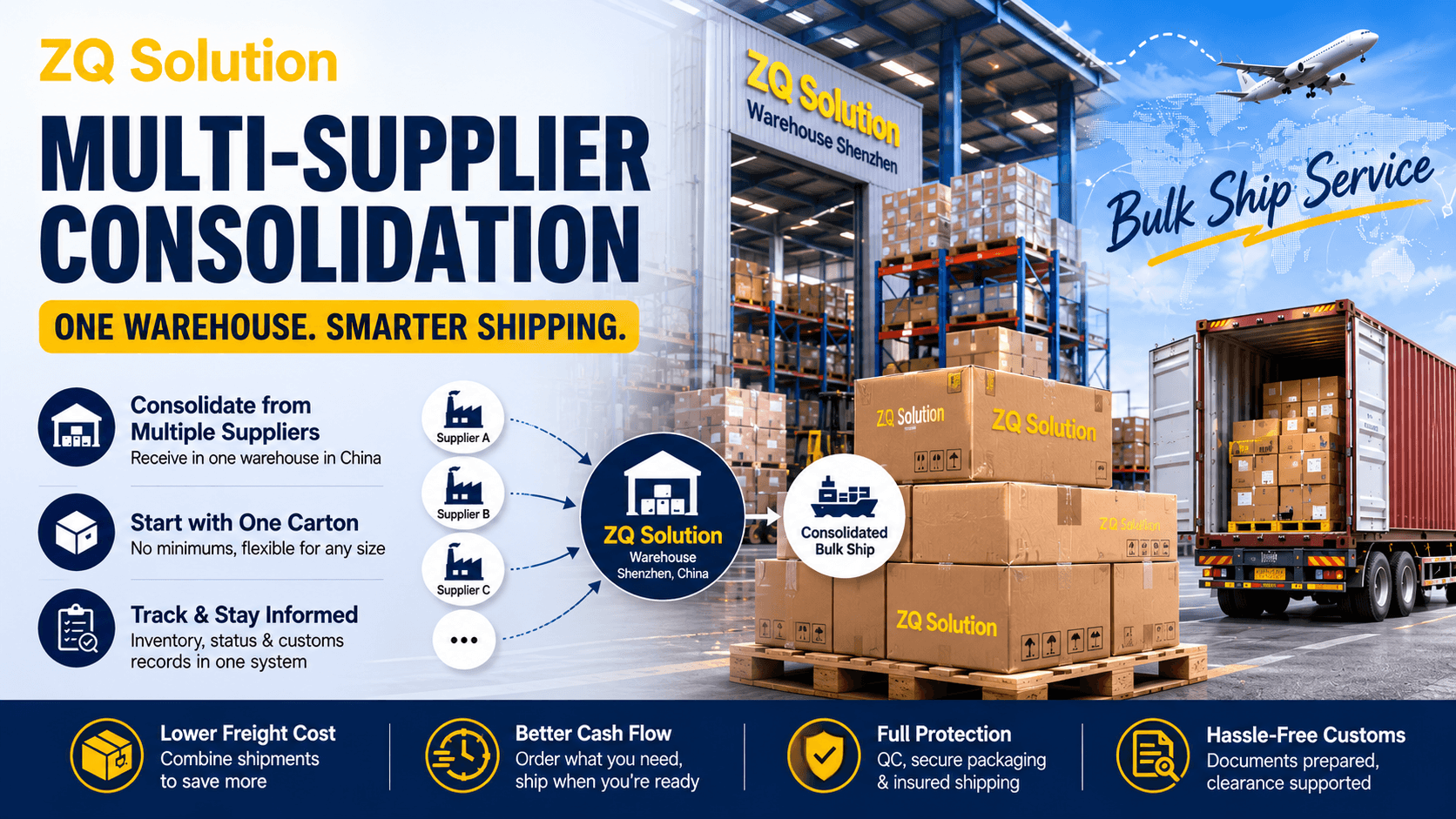
With Bulk Ship, sellers no longer have to choose between paying separate international shipping charges for multiple suppliers and ordering more stock simply to spread the freight cost. Goods from different suppliers can first enter one warehouse in China, then ship in combinations based on the inventory actually received.
ZQ receives goods from different suppliers at one warehouse in China. As each batch arrives, the seller can use the available inventory, destination, and shipping requirements to create one or more Bulk Ship Orders.
ZQ does not have to source the products. You can buy products listed in the ZQ catalog, ask ZQ to source products outside the catalog, or send products purchased from your own suppliers in China to ZQ for consolidation.
How Can Consolidation Affect Inventory and Cash Flow?
Multi-supplier consolidation does not change a supplier's MOQ. It can, however, reduce the influence of separate international shipments on purchasing decisions and create an opportunity to avoid repeated international freight charges.
When each supplier ships internationally on its own, a seller may increase the quantity of one SKU to spread that shipment's freight cost. Products with unproven demand can then tie up more working capital in inventory.
If suppliers accept smaller orders, the seller can route their goods to one warehouse in China and combine multiple SKUs for international shipping. Purchase quantities can follow sales plans and inventory needs more closely instead of being driven by the freight economics of a single SKU.
It gives sellers more control over how inventory is grouped for shipping. Compare the actual dimensions, weight, destination, and shipping method before deciding which combination costs less.
How Do the Three Sourcing Routes Enter Bulk Ship Inventory?
Every sourcing route starts with a Bulk Ship Purchase Order. This applies when the customer buys from the ZQ catalog, asks ZQ to source a product outside the catalog, or purchases from another supplier. The Purchase Order records the purchase or incoming goods and tells the warehouse what it should expect to receive.
The three routes use different Listing, payment, and domestic-shipping procedures. After warehouse receiving, all three become Bulk Ship Inventory that the customer can use to build international shipments.
1. Buy Products from the ZQ Catalog
Select the product, Variant, and quantity from the ZQ catalog. The system automatically provides the product name, image, Supplier, price, and weight, so the customer does not need to create another Listing.
Click “Buy for Bulk Ship,” create the Bulk Ship Purchase Order, and complete payment. ZQ then arranges the purchase and manages domestic shipping from the supplier to the ZQ warehouse in Shenzhen.
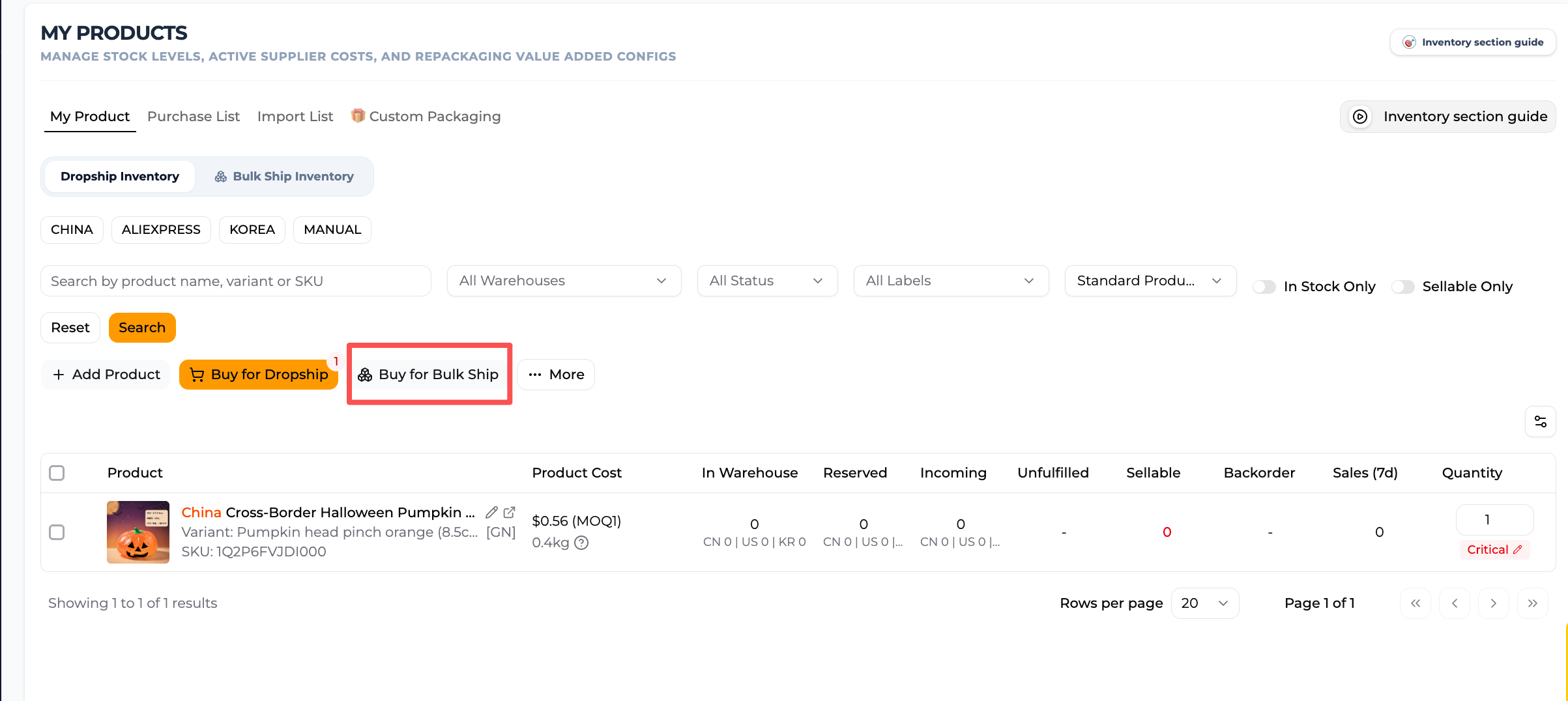
- Find the product under My Products and click “Buy for Bulk Ship.”
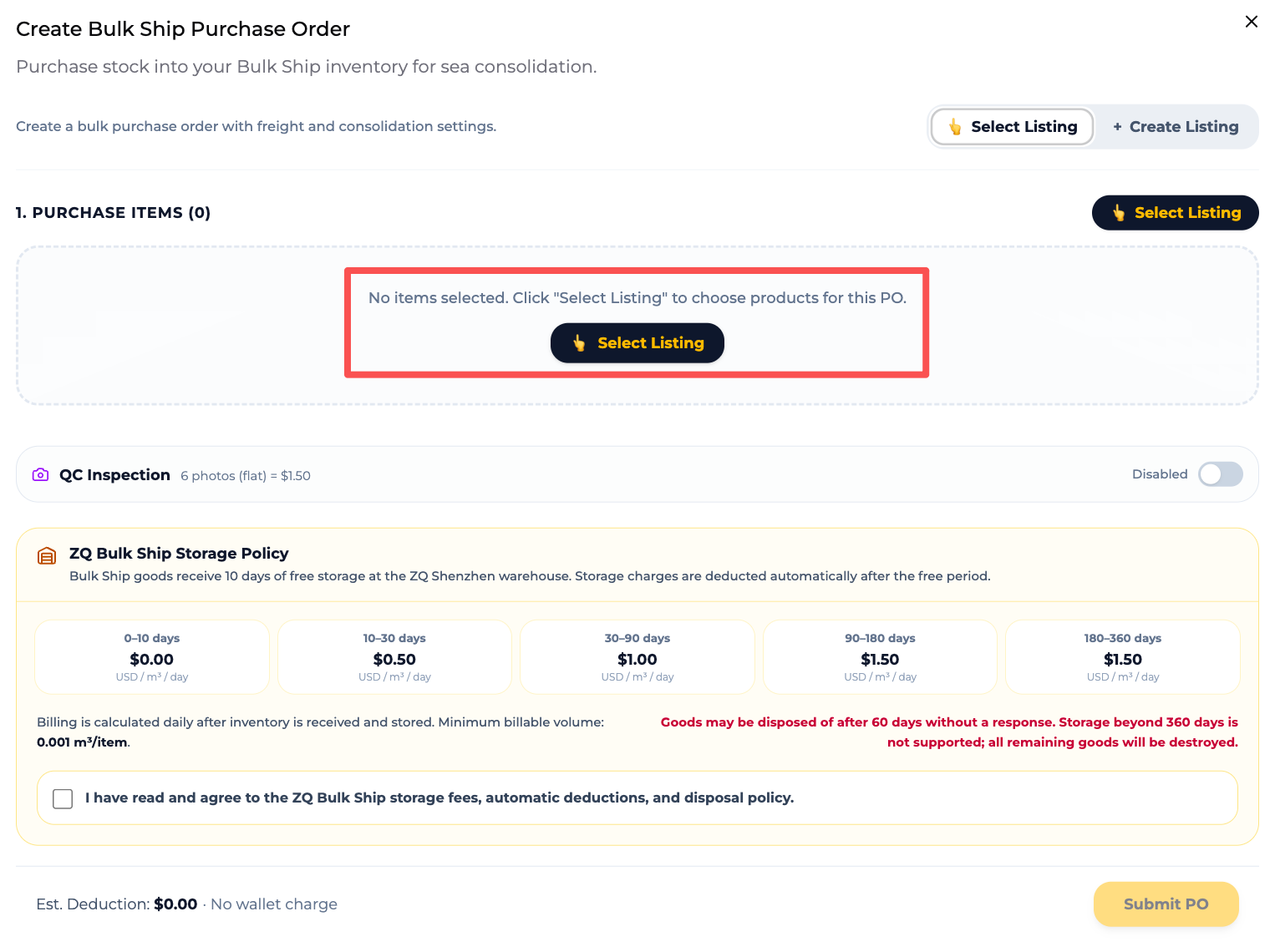
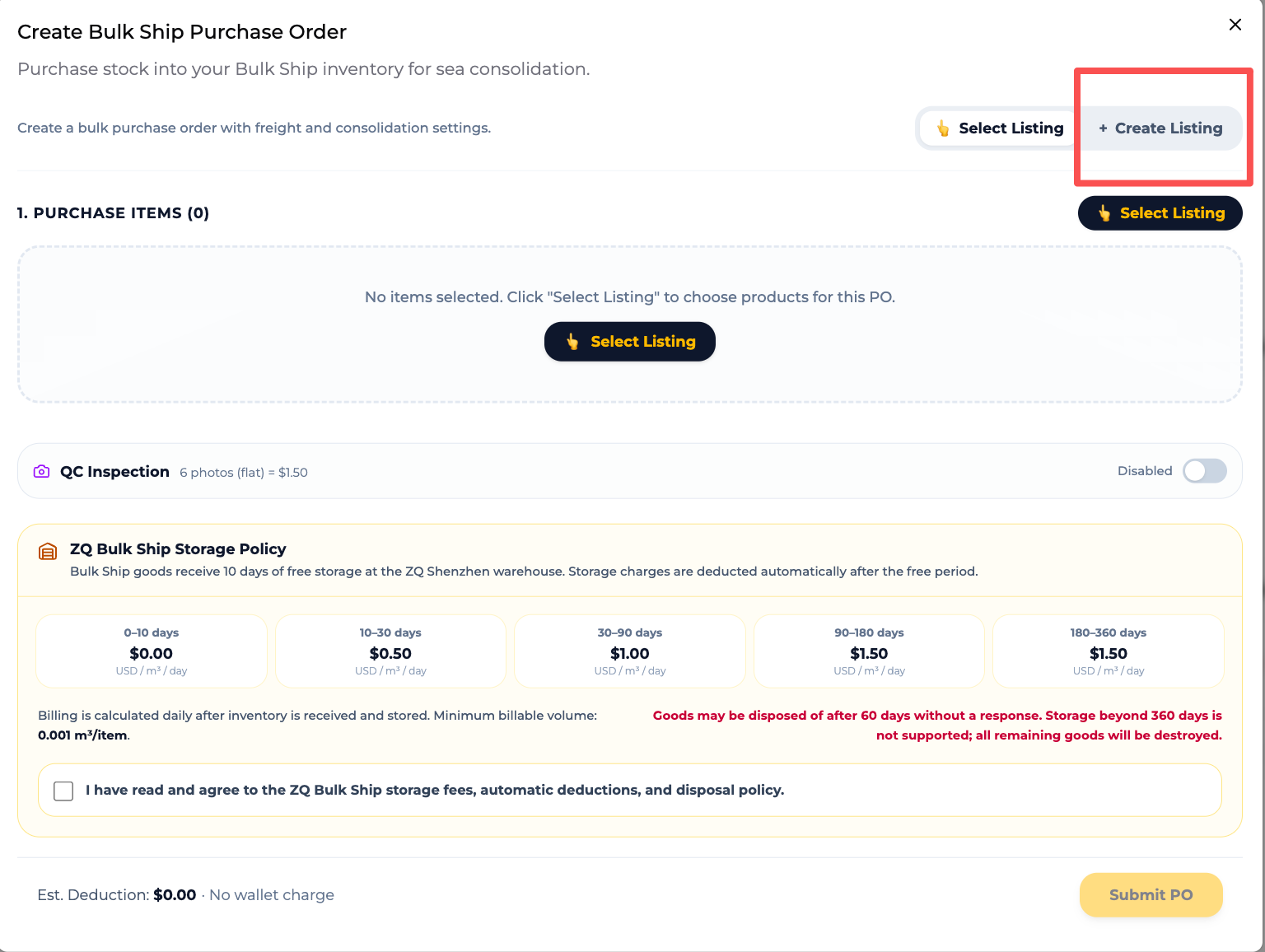
- On the Create Bulk Ship Purchase Order page, click “Select Listing.”
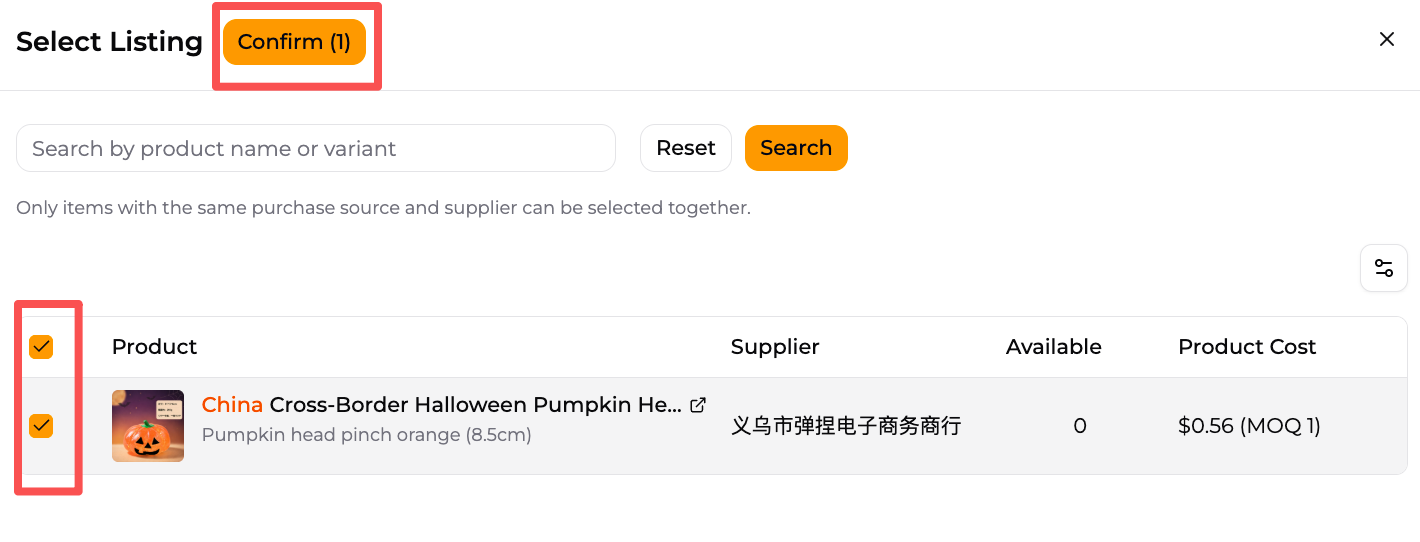
- Select the required product and Variant, then click “Confirm.”
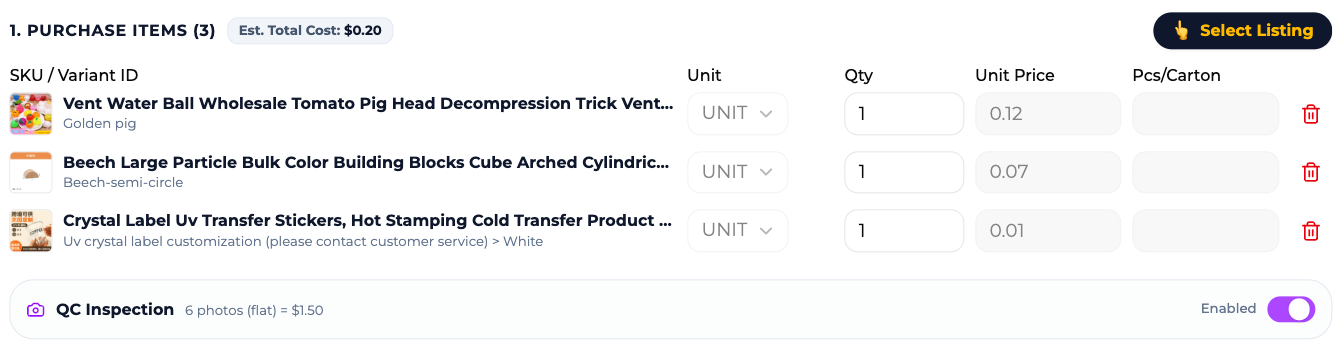
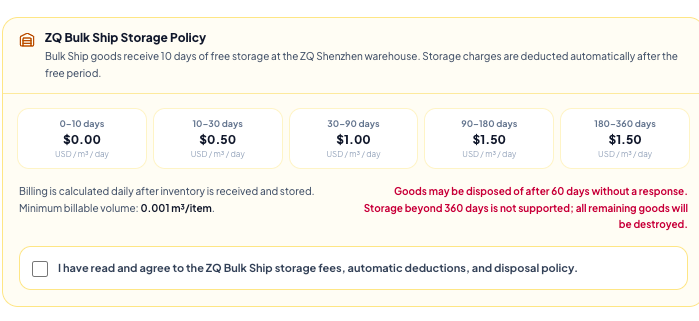
- Confirm the quantity, choose whether to add QC, and accept the Bulk Ship storage policy.
- Review the product cost and submit the Purchase Order. ZQ starts purchasing after payment is received.
2. Ask ZQ to Source a Product Outside the Catalog
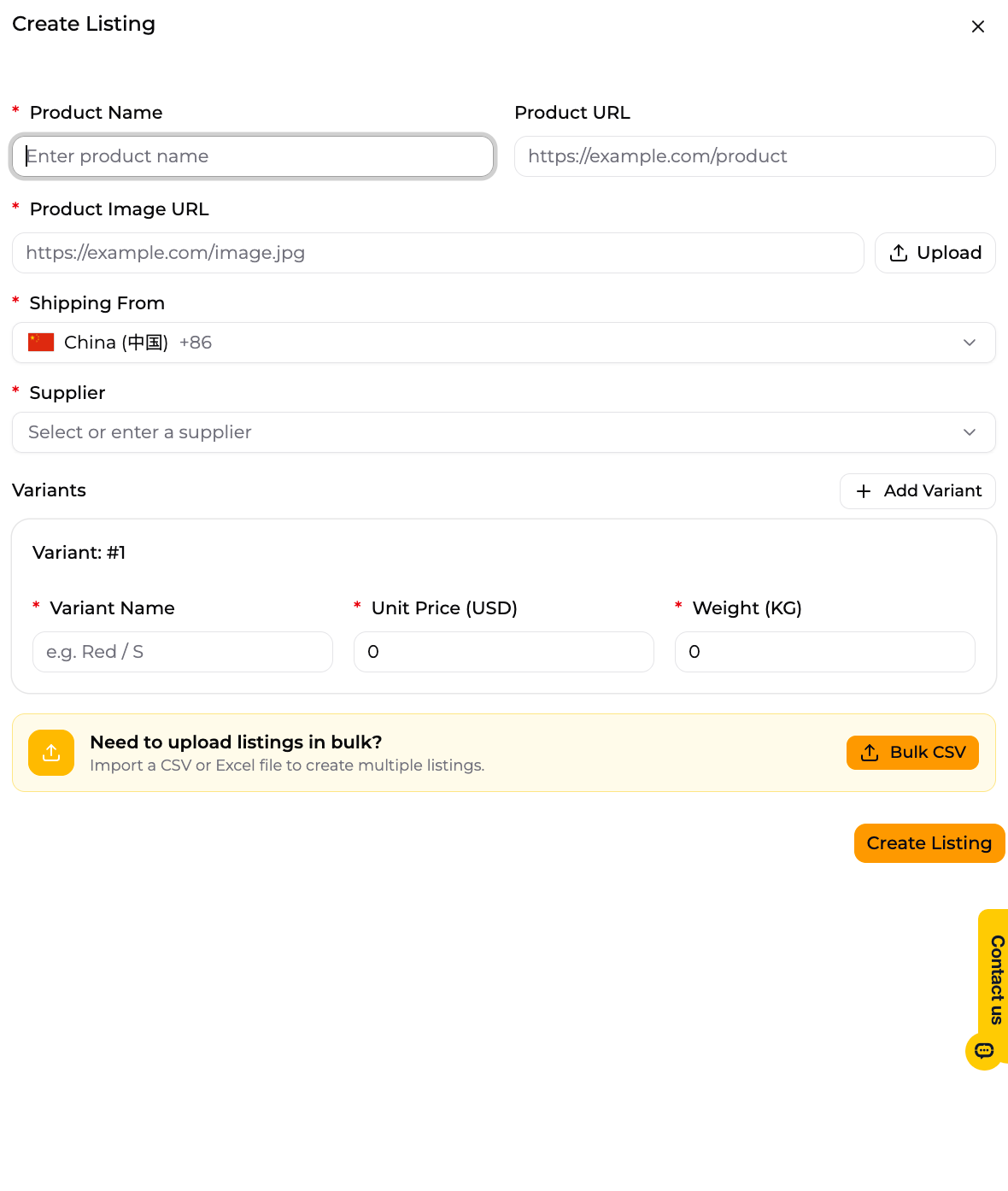
For a product from Alibaba, AliExpress, or another source outside the ZQ catalog, first use Create Listing to enter the product name, a real product image, Supplier, Variant, unit price, and weight. Product URL is optional. Enter it when available or leave it blank. Unit Price is required because ZQ needs the value of the goods for the inventory and later shipping records.
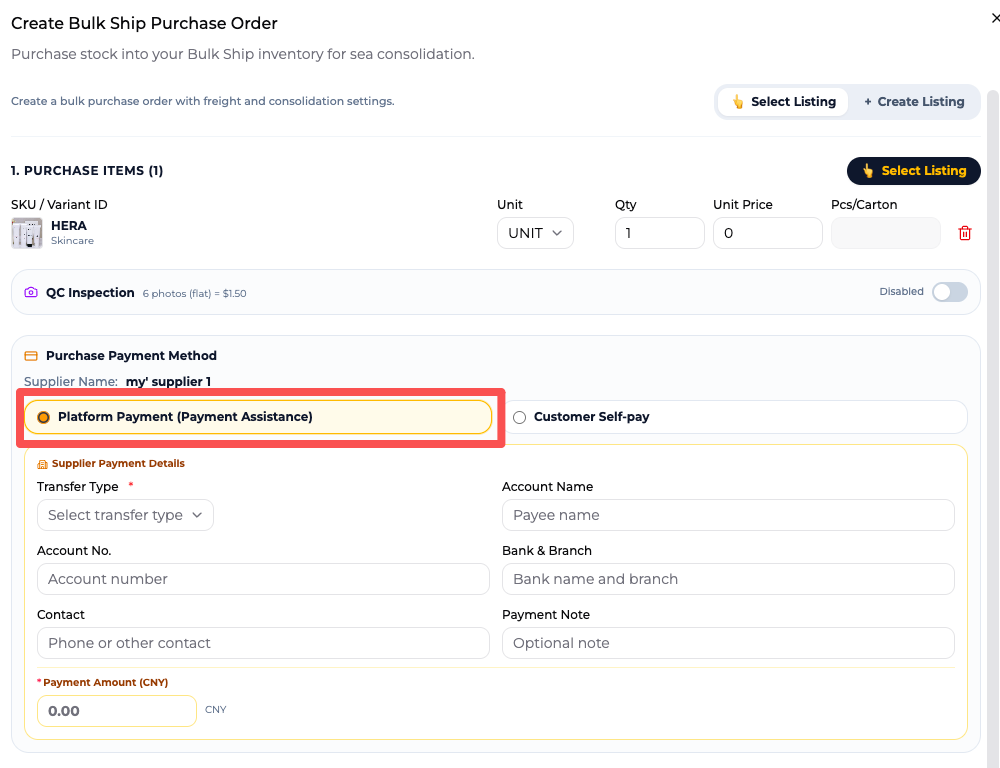
After creating the Listing, create a Bulk Ship Purchase Order, select the product and quantity, and choose “Platform Payment (Payment Assistance).” Enter the supplier's payment details and purchase amount, then pay ZQ. ZQ purchases from the supplier after receiving payment and manages domestic shipping to the ZQ warehouse in Shenzhen.
3. Buy from Your Own Supplier and Use ZQ Only for Consolidation
Customer-sourced products also require a Bulk Ship Purchase Order before the supplier ships. In this route, the Purchase Order serves as the inbound notice: it tells the warehouse which products and quantities are coming and identifies the owner of the goods. ZQ will reject a package sent without a Purchase Order because the warehouse cannot identify or receive it correctly.
- Under My Products, click “Buy for Bulk Ship” to open Create Bulk Ship Purchase Order.
- Click “Create Listing” and enter the product name, a real product image, Supplier, Variant, unit price, and weight. Use CSV or Excel to create multiple Listings in bulk.
- Select the new Listing and inbound quantity, choose whether to add QC, and accept the Bulk Ship storage policy.
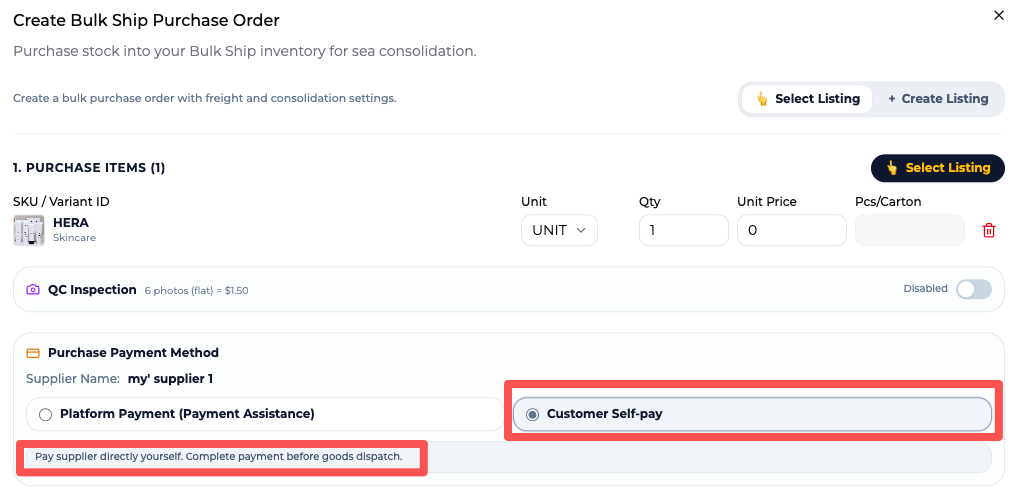
- Set the payment method to “I Already Paid” and submit the Bulk Ship Purchase Order as the inbound notice.
- Give the supplier the ZQ Shenzhen warehouse address and the required receiving reference.
- After dispatch, the supplier gives the customer the domestic tracking number. Add one tracking record for each carton or parcel shipped; the system then updates its transit and warehouse-receiving status automatically.
Do not add a separate tracking record for every SKU. Add one domestic tracking number for each carton or parcel actually shipped by the supplier. If 10 SKUs ship in one carton, enter one record; if the supplier sends two cartons or two batches, enter two. After receiving, inventory from different suppliers can still be added to the same Bulk Ship Order.
| Product source | Product data | Before warehouse delivery | Domestic shipping in China |
|---|---|---|---|
| Product in the ZQ catalog | Provided automatically by the system | Create the Purchase Order and pay the product cost | Managed by ZQ |
| Outside-catalog product sourced by ZQ | Customer creates the Listing; Unit Price is required | Create the Purchase Order, select Platform Payment, and complete payment | Managed by ZQ |
| Product sourced by the customer | Customer creates each Listing or imports multiple Listings by CSV or Excel | Create the Purchase Order, select I Already Paid, and submit it as the inbound notice | Customer enters tracking for each carton or parcel actually shipped |
Select QC at the Purchase Order Stage for All Three Routes
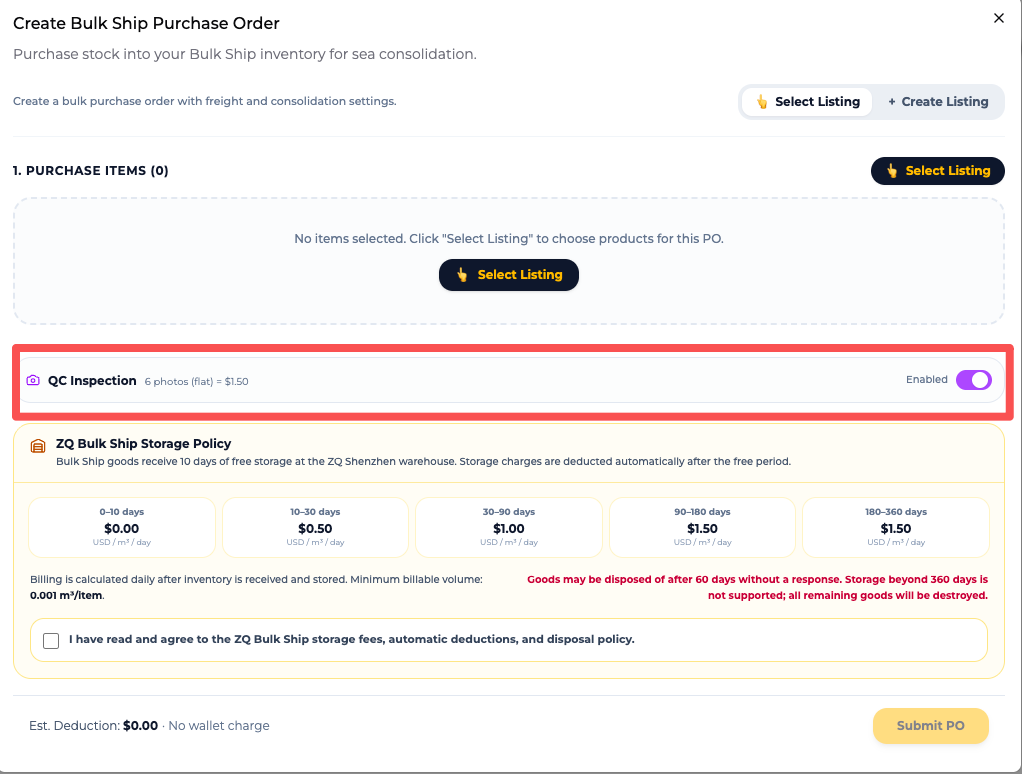
QC is not selected in the final international shipping order. Regardless of the sourcing route, the customer decides whether to enable QC when submitting the Bulk Ship Purchase Order and accepts the Bulk Ship storage policy at the same stage.
How Do Customer-Sourced Products Get a Listing?
Every customer-sourced product sent to ZQ for Bulk Ship requires a Listing. Create Listings individually or import them in bulk with CSV or Excel.
Products containing batteries, liquids, powders, food, cosmetics, plants, chemicals, or medical-related items require a route review based on the destination, shipping method, ingredients, quantity, packaging, and documentation. If goods arrive without prior confirmation and cannot be shipped, the customer may request return or disposal and is responsible for the related charges.
What Does ZQ Check When Supplier Shipments Arrive?
Different suppliers can dispatch separately and arrive at the ZQ Shenzhen warehouse at different times. For customer-sourced goods, the system updates transit and arrival status after the customer adds the supplier's domestic tracking number to the corresponding Purchase Order. ZQ manages domestic tracking for products purchased by ZQ.
Free warehouse receiving checks the number of outer cartons or parcels physically received. If the inbound record lists five cartons but the warehouse receives four, ZQ notifies the customer. The customer then follows up with the supplier or domestic carrier about the missing carton.
| Service | What it covers |
|---|---|
| Free receiving check | Number of outer cartons or parcels physically received |
| Paid QC | Six units randomly sampled from all goods covered by the QC selection, with six photos returned |
| Piece-by-piece count or full inspection | Not included in free receiving or the flat-fee sample QC |
“Five cartons received” means the warehouse received five outer cartons or parcels. It does not mean that every SKU, quantity, and Variant inside those cartons has passed a full inspection.
Should You Wait for Every Supplier or Ship the Inventory Already Received?
The customer decides based on replenishment timing, expected arrival dates, and current shipping needs. Storage time starts separately for each batch when that batch is received into inventory. The first 10 days are free; storage charges apply after day 10, and ZQ sends a reminder as the free period approaches its end.
Wait for the Remaining Goods
If the other shipments are expected soon, wait and select the inventory together after the required goods arrive. Each batch begins accruing storage charges based on volume and storage time after its own 10-day free period ends.
Ship the Inventory Already Received
If some products need to leave quickly, create the first Bulk Ship Order with inventory already received. Create another order after the delayed goods arrive.
Split by Destination or Shipping Requirements
Even when all goods have arrived, the customer can create separate Bulk Ship Orders for different destinations, shipping methods, or packaging requirements.
How Do You Create a Bulk Ship Order After Receiving?
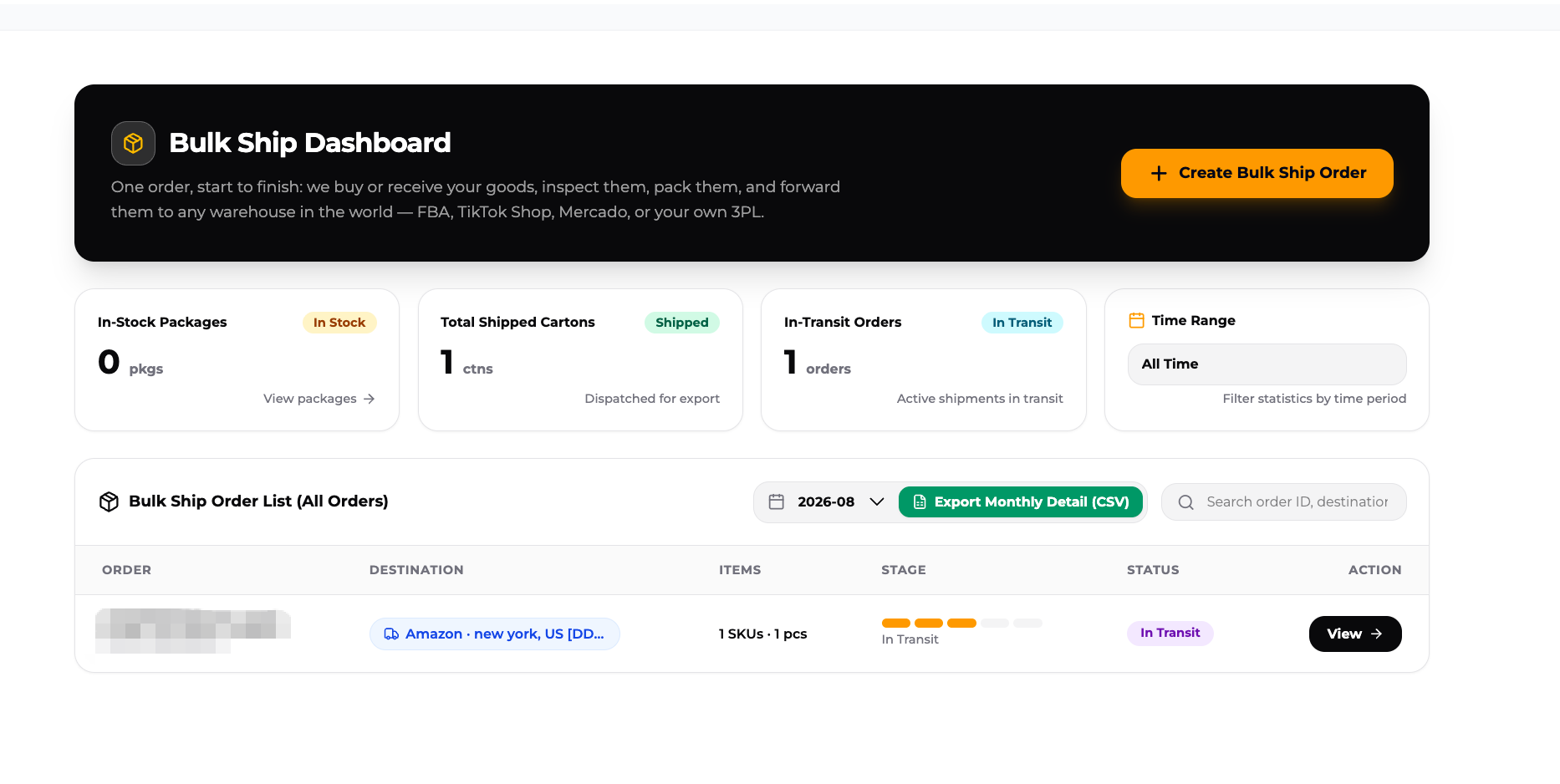
The Bulk Ship Purchase Order created before warehouse delivery records the purchase or inbound shipment. It is not the final instruction for international shipping. After warehouse receiving creates Bulk Ship Inventory, go to the Bulk Ship Dashboard and create a Bulk Ship Order.
The customer chooses which received inventory to ship in each order. One Bulk Ship Order can include inventory from different suppliers and different Purchase Orders. The customer can also split inventory into separate orders based on arrival timing, destination, or shipping requirements.
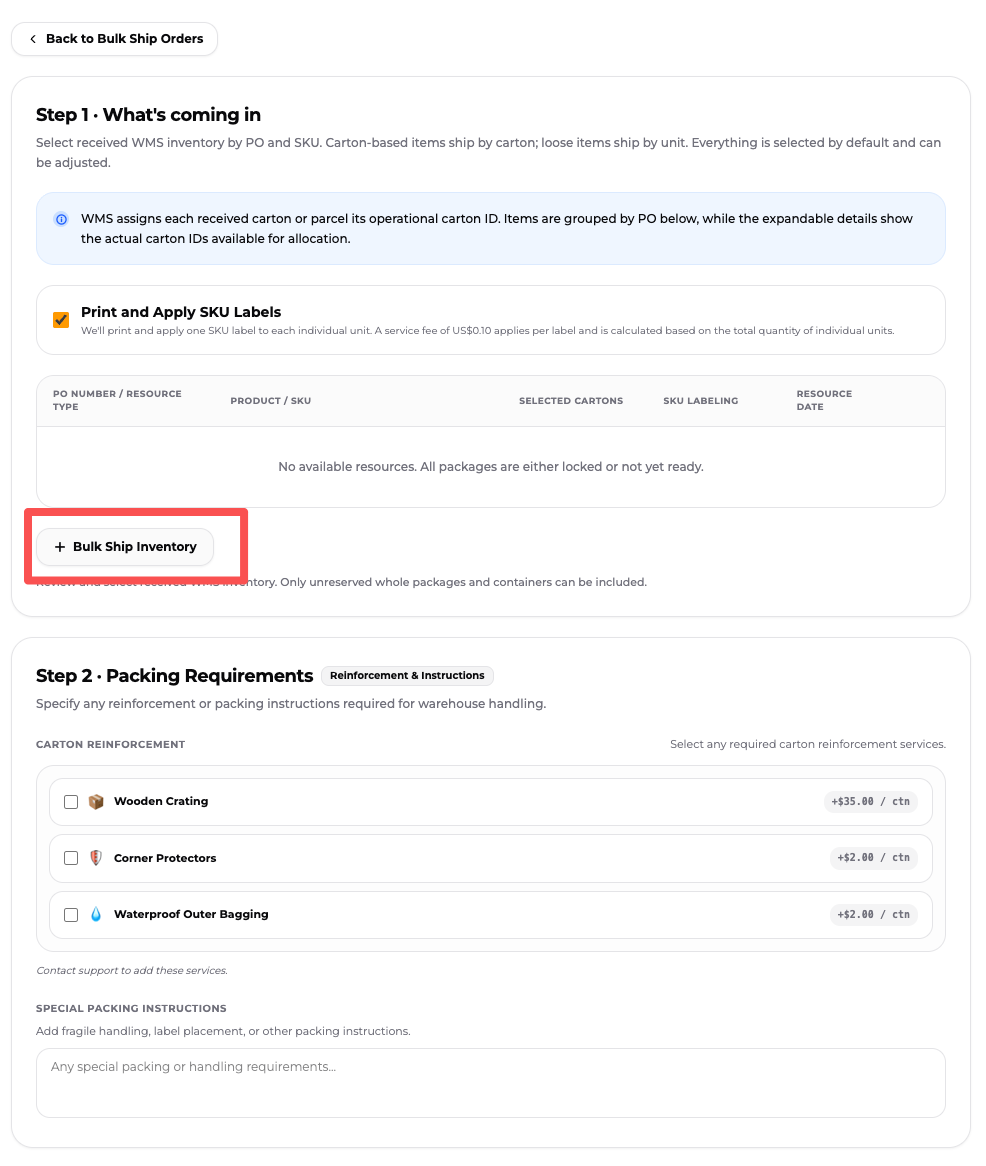
The Purchase Order tells ZQ what it will purchase or receive and records the QC choice. The Bulk Ship Order is created after receiving and tells ZQ where to ship, which inventory to use, and which labeling or protective-packaging services are required.
What Does ZQ Do After the Bulk Ship Order Is Submitted?
The Bulk Ship Order authorizes ZQ to process the selected inventory. Based on the destination, inventory, and services confirmed in the order, ZQ can:
- Consolidate cartons, split cartons, or replace packaging;
- Add wooden crates, corner protectors, waterproof outer bags, or other protection;
- Apply SKU labels and perform other selected warehouse services;
- Measure dimensions and weight and prepare packing data;
- Book freight, complete China export customs procedures, and coordinate international transportation;
- Coordinate destination-country clearance, last-mile delivery, and exception handling.
SKU labeling is optional and currently costs USD 0.10 per label. Consolidation may remove duplicate outer packaging, but it does not guarantee a lower chargeable weight or total shipping cost.
The shipping plan cannot be changed after consolidation is completed. Confirm the inventory, destination, shipping requirements, and value-added services before submitting the Bulk Ship Order.
How Does ZQ Handle Customs and Tracking After the Goods Leave Shenzhen?
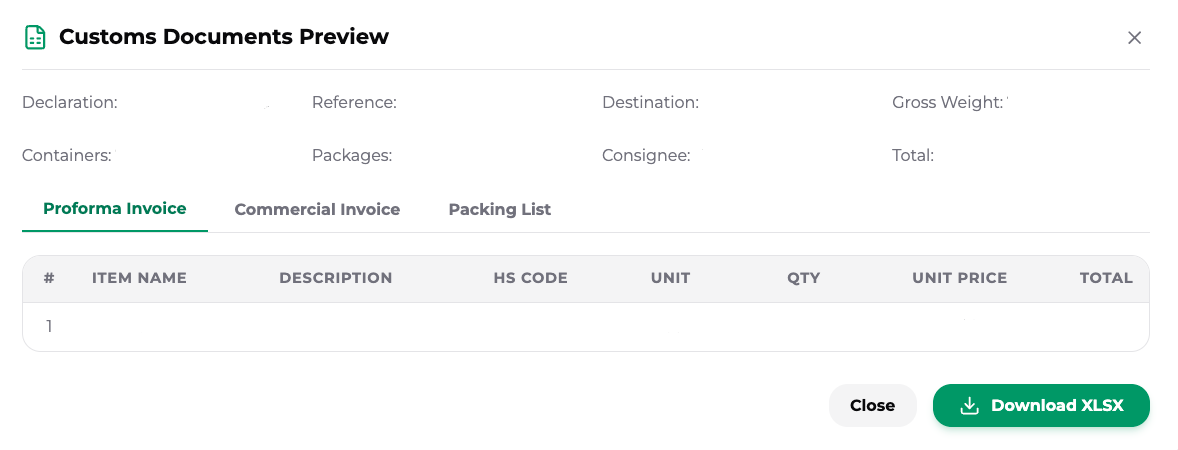
ZQ completes China export customs procedures for the consolidated goods and coordinates the destination-country clearance process. After a Bulk Ship Order is created, the ZQ system automatically generates customs documents from the order data, including a pro forma invoice, commercial invoice, and packing list, which the customer can view and download.
The customer must ensure that product names, quantities, and declared values are accurate. If the destination requires a tax number, EIN, VAT number, EORI number, or other import information, the required documents depend on the country, SKU, and shipping route. The customer is responsible for import duties and taxes, and the Importer of Record must be confirmed for the actual shipment.
Once processing starts, the customer can view the pre-export domestic movement from the ZQ Shenzhen warehouse to the export port or customs-supervised facility. Export declaration, possible customs inspection, and release occur after the goods reach the relevant facility; customs does not physically inspect every shipment. The customer receives the international tracking number after international dispatch.
Each international shipment is insured. If goods are lost during international transportation arranged by ZQ and the loss falls within the policy's coverage, the claim is handled under the applicable insurance terms. Shortages or losses before the goods reach the ZQ warehouse are outside the same liability scope.
How Can You Estimate International Shipping Costs?
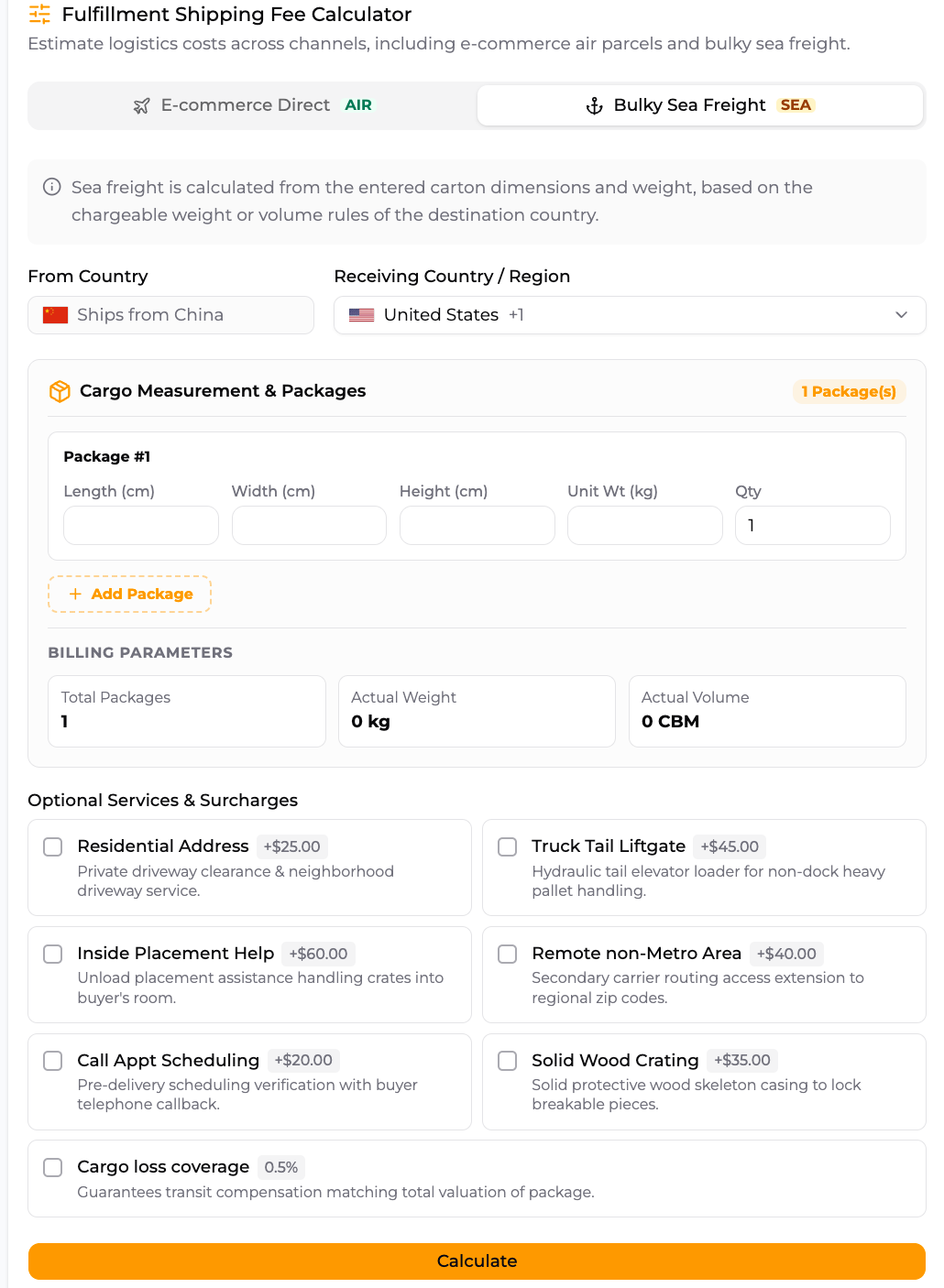
Multi-supplier consolidation does not automatically reduce freight costs. The final charge depends on the destination, measured dimensions, actual weight, chargeable weight, shipping method, and selected value-added services.
Use the ZQ shipping calculator to enter the destination country or region, number of packages, dimensions, weight, and air or sea shipping method. More accurate inputs generally produce a closer estimate.
After warehouse receiving, carton consolidation, splitting, repacking, warehouse measurements, and added services may change the final charge. Compare possible shipping combinations with actual inventory data instead of assuming that consolidation will always cost less.
Frequently Asked Questions About ZQ Multi-Supplier Consolidation
Do I need a purchase order if I buy the products myself and ship them directly to ZQ?
Yes. For customer-sourced products, the Bulk Ship Purchase Order also serves as the inbound notice: it tells the ZQ warehouse which products and quantities are coming and identifies the owner of the goods. The warehouse will reject packages that arrive without a Purchase Order because it cannot identify or receive them correctly.
What is the difference between a Bulk Ship Purchase Order and a Bulk Ship Order?
A Bulk Ship Purchase Order records a purchase or an inbound shipment, and this is where the customer selects QC. After the goods have been received into inventory, the customer creates a Bulk Ship Order to enter the destination, select inventory, and request SKU labeling or protective packaging.
For customer-sourced goods, do I enter domestic tracking information for every SKU?
No. Enter one tracking record for each carton or parcel actually shipped by the supplier, not for each SKU. If 10 SKUs ship in one carton, enter one tracking record; if the supplier sends two cartons or two batches, enter two records.
Can goods from different suppliers be added to the same Bulk Ship Order?
Yes. Once goods from different suppliers have been received into Bulk Ship Inventory, the customer can select which inventory to combine in one Bulk Ship Order.
When do I select QC for a Bulk Ship shipment?
QC is selected when the Bulk Ship Purchase Order is created, regardless of which sourcing route is used. The current flat-fee QC service costs USD 1.50 and randomly samples six units from all goods covered by that QC selection, returning six photos.
Do I have to wait until every supplier shipment reaches the warehouse?
No. The customer can wait or ship the inventory already received, depending on delivery needs and expected arrival dates. Each batch receives 10 days of free storage from the date it is received into inventory; storage charges apply after that period.
Manage Multiple Suppliers Through One Warehouse in China
Multi-supplier consolidation turns separate supplier shipments into received inventory that the seller can track, select, and group for international shipping.
- Select or create the Listing and create a Bulk Ship Purchase Order;
- Choose whether to add QC and complete the purchase or inbound notice;
- ZQ or the customer arranges delivery from the supplier to the ZQ Shenzhen warehouse;
- Track supplier shipments and warehouse-receiving status;
- Decide whether to wait or ship the inventory already received;
- Enter the destination, select inventory, and create one or more Bulk Ship Orders;
- Select SKU labeling, packaging, and protective services;
- ZQ completes the warehouse work and coordinates international transportation.
For ecommerce sellers managing many SKUs, this approach lets shipment composition and timing follow the actual sales and inventory plan instead of forcing each supplier to ship internationally on its own.