
Shopify Dropshipping in 2026: Sourcing, Auto Fulfillment, and Shipping with ZQ
 Written by Olivia ZhangPublished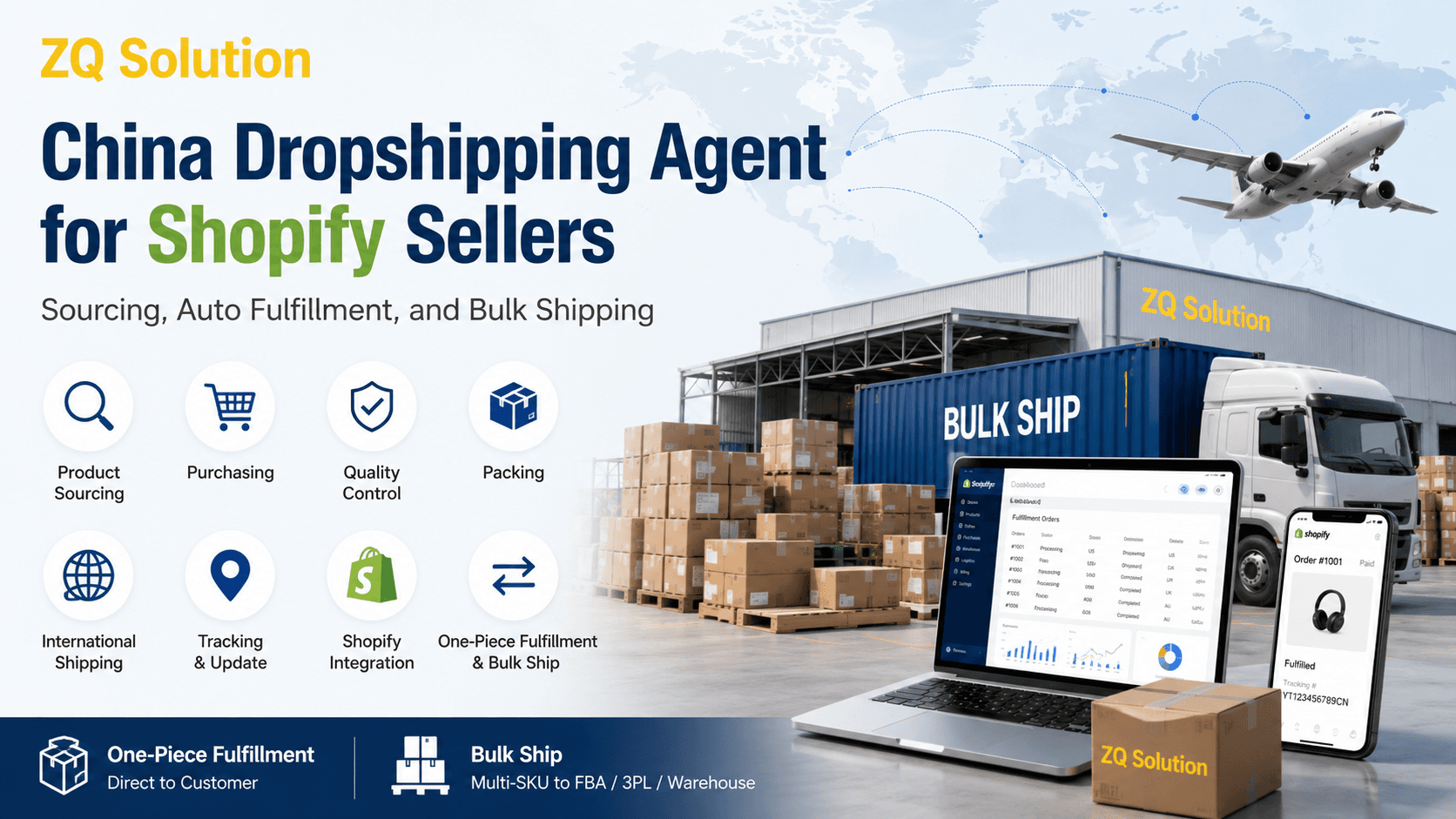
Shopify dropshipping allows a seller to list and sell products without purchasing inventory for every SKU in advance. After a customer places an order, the selected product is purchased, prepared for shipment, and delivered to the customer on the seller's behalf.
The difficult part is not opening a Shopify store. It is connecting product sourcing, the correct store SKU, purchase payment, quality inspection, packing, international shipping, and tracking. ZQ brings these steps into one workflow for Shopify sellers sourcing products from China.
Once the Shopify store is connected and each new SKU has been matched, customer orders can sync to ZQ automatically. Sellers can then use Auto-Fulfill or keep purchase payments manual, depending on how they want to control their orders.
Table of Contents
- How Does Shopify Dropshipping Work with a China Fulfillment Agent?
- What Do Shopify Dropshipping Sellers Need Before They Start?
- How Can Shopify Sellers Source Products Through ZQ?
- How Do You Connect Shopify and Match the First SKU?
- How Do Shopify Orders Move Through ZQ?
- What Must Be Set Before Auto-Fulfill Can Run?
- What Should Sellers Confirm Before Choosing a Fulfillment Setup?
- One-Piece Fulfillment or Bulk Ship: Which Fits the Order?
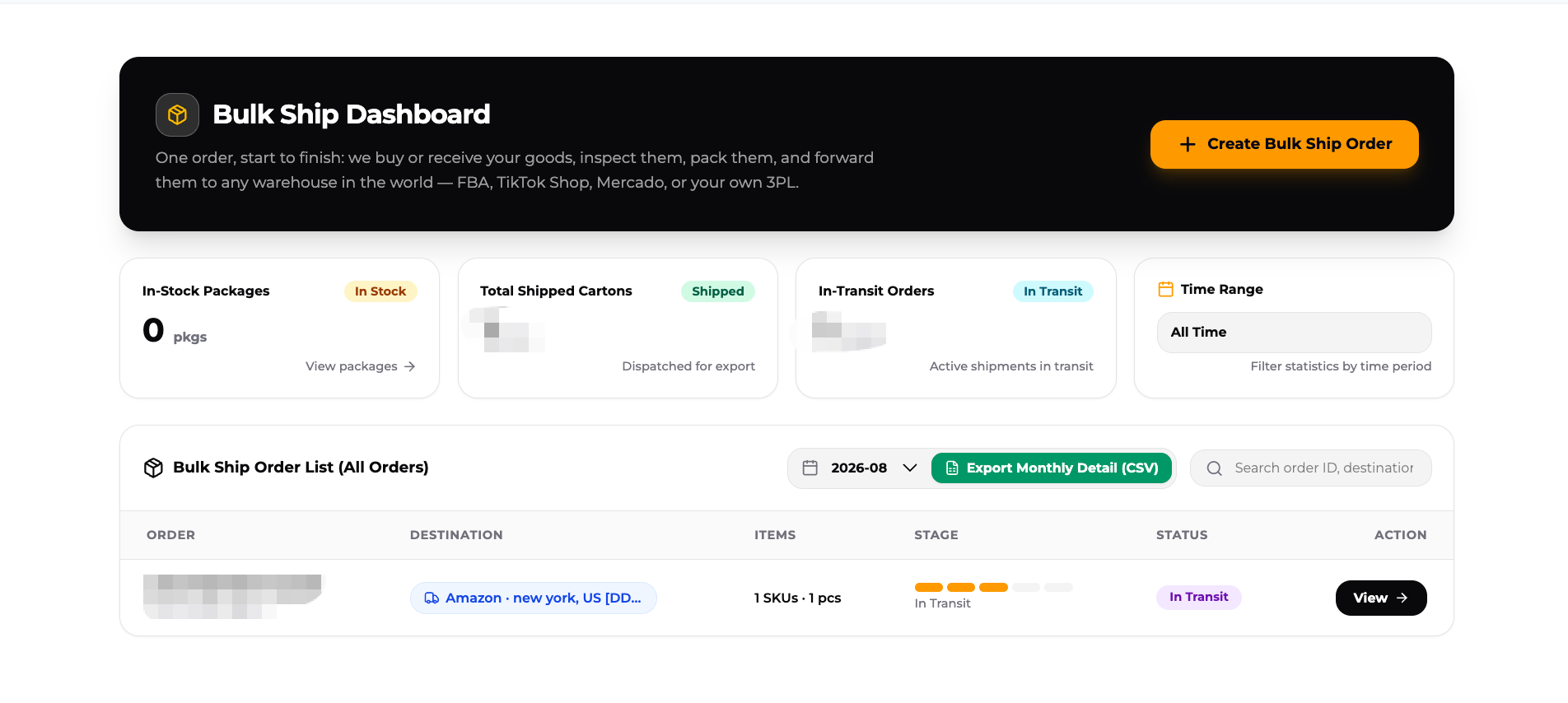
- How Does ZQ Bulk Ship Work?
- Frequently Asked Questions
How Does Shopify Dropshipping Work with a China Fulfillment Agent?
In a Shopify dropshipping workflow, Shopify handles the customer-facing sale while the fulfillment agent handles the product and shipment after the order is placed. The seller does not need to receive, inspect, or pack every customer order personally.
A product still needs to be sourced, matched to the correct store SKU, purchased from the intended source, received at the warehouse, checked, packed, shipped, and linked back to the correct Shopify order. If those steps sit with separate suppliers and systems, the seller becomes the person moving order information between them.
ZQ connects those steps in one operating flow:
- Connect the Shopify store.
- Select a product or ask ZQ to source it.
- Match each new Shopify SKU to the chosen product.
- Receive Shopify customer orders in the ZQ system automatically.
- Purchase automatically or keep payment manual.
- Receive, inspect, pack, and dispatch the product from China.
- Return the international tracking number to Shopify.
- Follow shipping exceptions after dispatch.
This page focuses on the sourcing and fulfillment side of Shopify dropshipping. It does not cover store themes, advertising, domains, or other storefront setup decisions.
What Do Shopify Dropshipping Sellers Need Before They Start?
Before connecting a fulfillment workflow, the seller should know what will be sold, where orders will be delivered, and how much control should remain manual.
The basic preparation includes:
- A Shopify store that can receive customer orders.
- A product already selected, or enough product information for ZQ to source it.
- Accurate SKU and variant details, such as color, size, model, or specification.
- The main destination countries for customer orders.
- A realistic shipping-cost and delivery-time range for the product.
- A decision between Auto-Fulfill and manual purchase payment.
- A QC option for the orders.
These decisions affect whether a product can be sold profitably. Product price alone is not enough. The seller also needs to account for the packed parcel, destination, available shipping route, and expected delivery time.
How Can Shopify Sellers Source Products Through ZQ?
Shopify sellers should not have to limit product sourcing to one marketplace or a fixed supplier list. ZQ offers tens of thousands of SKUs, with multiple sourcing options available for many products. Products purchased through ZQ support one-piece purchasing, which lets sellers test products without committing to a large quantity.
A seller can begin in two ways:
Select a product already available through ZQ
The seller searches the available products, reviews the sourcing options, and chooses the SKU and supplier that fit the store. Multiple sources for a similar product make it possible to compare available product options instead of accepting the first listing found online.
This approach is useful when the seller wants to test several products or build a broader Shopify catalog without pre-purchasing inventory for every SKU.
Once a product is selected, match the exact SKU and variant to the Shopify listing. This is a one-time setup. Later orders for the same SKU reuse the saved match automatically.
Ask ZQ to source a specific product
If the product is not already available, the seller can submit a sourcing request. ZQ can source and quote products based on the seller's link or requirements. The request is not limited to 1688. A seller can also submit a product found on AliExpress, Temu, or another source and ask ZQ to arrange purchasing and fulfillment.
How Do You Connect Shopify and Match the First SKU?
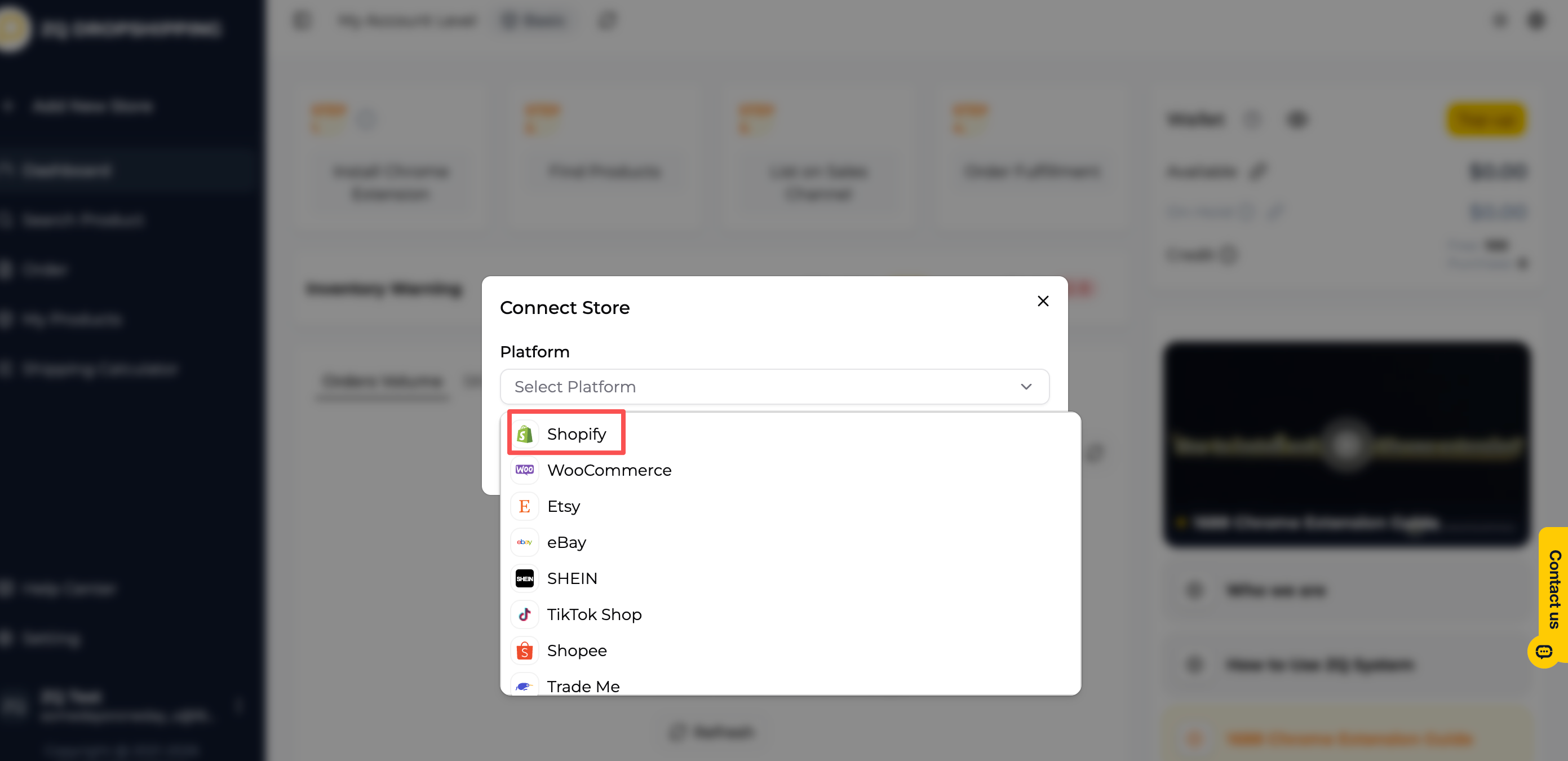
The seller connects Shopify directly inside the ZQ system. After the connection is authorized, products and orders can move between Shopify and ZQ without the seller re-entering the same order information.
Connecting the store is only the first setup step. Each new Shopify SKU must be matched once to the product and supplier selected in ZQ.
The first-SKU process is:
- Find or source the product in ZQ.
- Confirm the correct variation, such as color, size, model, or specification.
- Match that ZQ SKU to the corresponding Shopify store SKU.
- Publish the product to Shopify, or connect the match to an existing store listing.
- Save the relationship for future orders.
The match is completed for each new SKU, not once for the entire store. After that SKU has been matched, later orders for the same SKU reuse the saved relationship. The seller does not need to match it again for every customer order.
Connecting a Shopify store therefore does not automatically decide which supplier should fulfill every product. At the same time, repeat orders do not require the seller to rebuild the product connection each day.
How Do Shopify Orders Move Through ZQ?
After the SKU has been matched, a Shopify customer order follows a repeatable path.
- The customer orders from the Shopify store. The product, variation, quantity, and delivery address are captured at checkout.
- The order syncs to ZQ. The seller does not need to enter the order again. ZQ creates a purchase order from the synced information.
- The product is purchased. Auto-Fulfill can use the available ZQ account balance, or the seller can pay the purchase order manually.
- The supplier sends the goods to ZQ's China warehouse. ZQ receives the inbound parcel against the purchase information.
- The order moves through warehouse fulfillment. ZQ completes receiving, QC, packing, and outbound processing according to the selected setup.
- ZQ dispatches the international shipment. The route depends on the product, destination, and available shipping option.
- Tracking returns to Shopify. The tracking number is added to the Shopify order so the seller and end customer can follow the shipment.
Shopify supports tracking supplied by a third-party fulfillment service. Once tracking is added to a fulfilled order, the customer can view delivery information through the Shopify order status page, shipping emails, and the Shop app.
Order sync and purchase payment are separate. An order can arrive in ZQ automatically even when the seller has chosen manual payment. Automatic sync saves the seller from copying order details; the selected payment setting decides when purchasing begins.
What Must Be Set Before Auto-Fulfill Can Run?
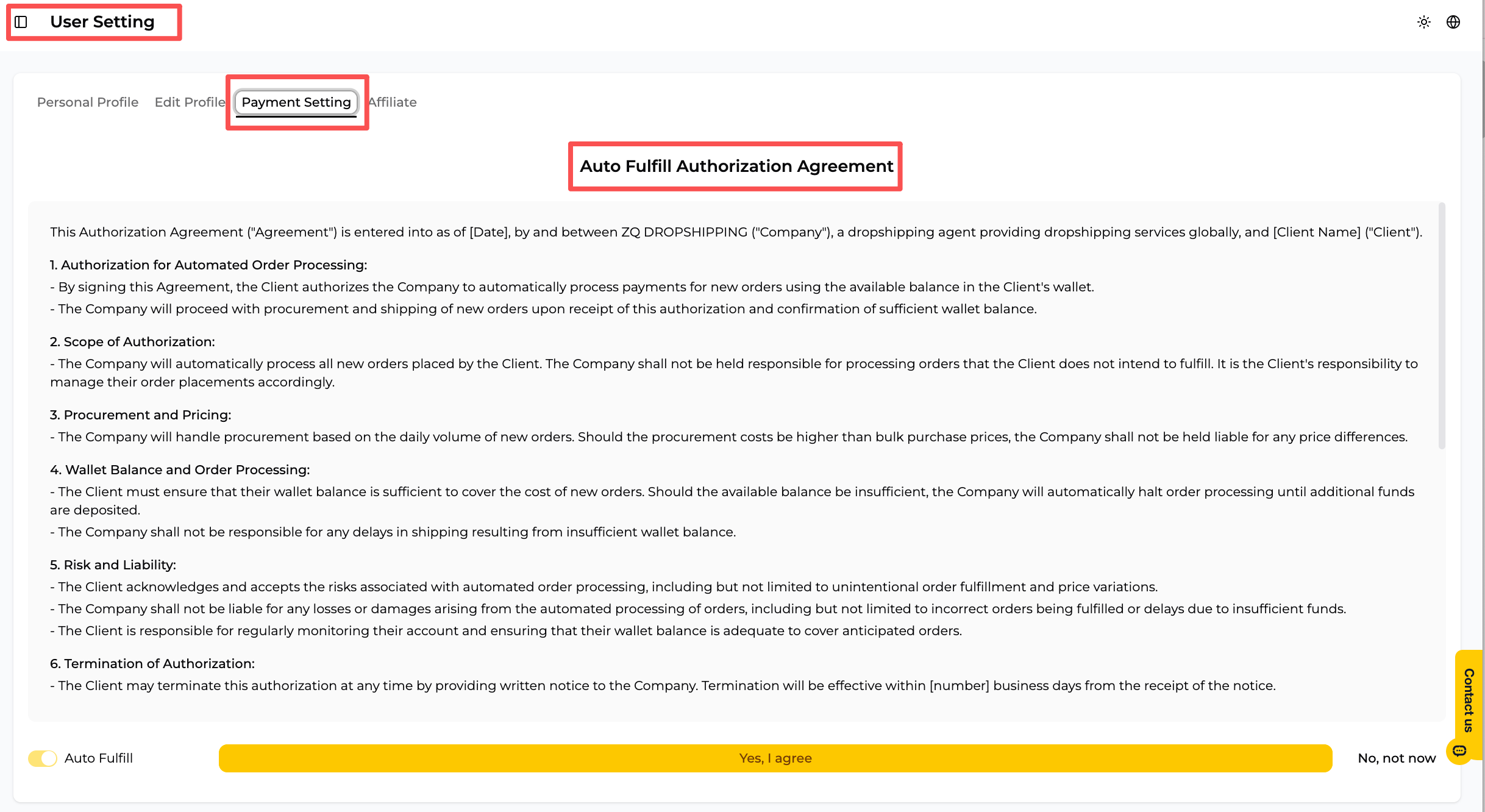
Auto-Fulfill is designed for sellers who do not want to approve and pay every routine purchase order one by one. It requires two settings: payment authorization and a QC choice.
Payment setting
The seller authorizes Auto-Fulfill and adds funds to the ZQ account. When a matched Shopify order syncs and the balance is sufficient, the product purchase cost can be deducted from that balance and the order can continue automatically.
If the available balance is not sufficient, automatic purchasing cannot continue until the account is funded or the purchase is handled through the available process.
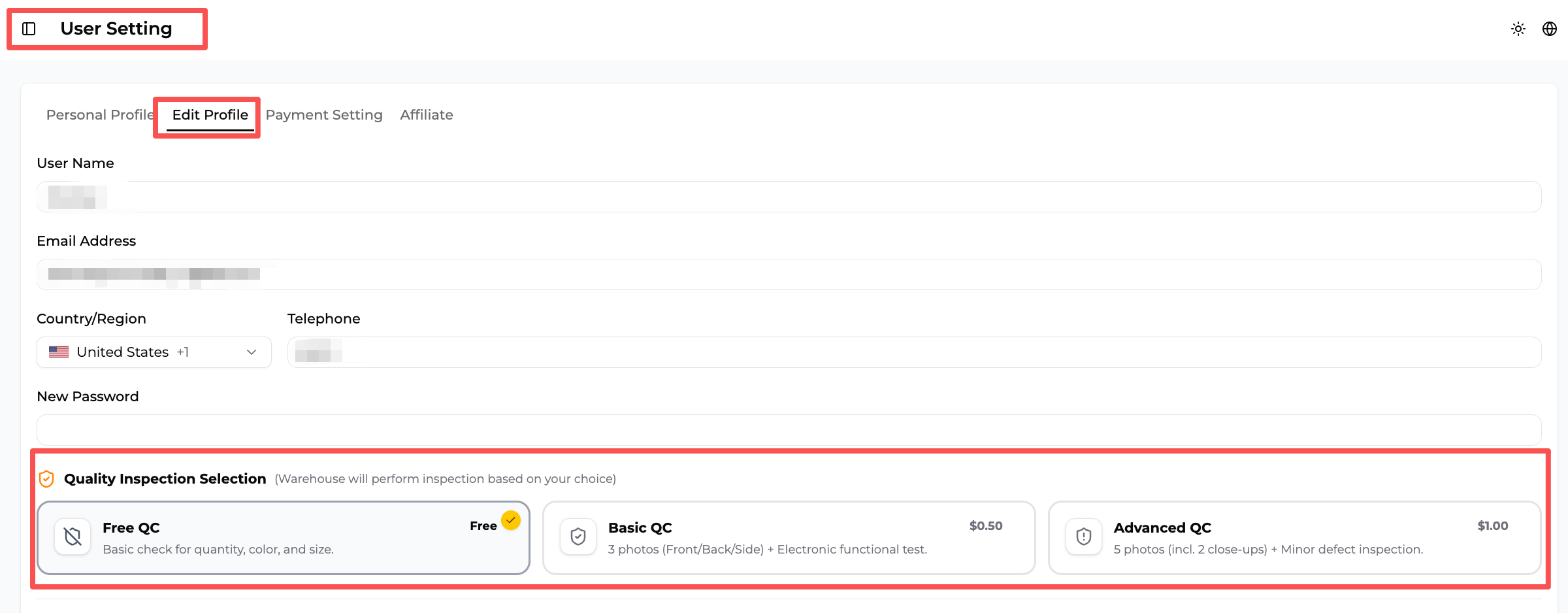
QC setting
The seller selects the QC option to apply to Auto-Fulfill orders. Free QC is the default. Other available QC levels can be selected in the system, and the setting can be changed later.
After payment and QC are configured, later orders can follow those choices without the seller repeating the setup for every purchase order.
If the seller keeps purchasing manual
Auto-Fulfill is optional. Without it:
- Shopify orders still sync to ZQ automatically.
- ZQ still creates the corresponding purchase order.
- The seller pays each purchase order manually.
- The seller selects the QC service for that purchase order; Free QC is the default selection.
- After payment, the remaining warehouse and shipping flow continues.
Manual purchasing keeps a payment checkpoint without turning the whole process into manual order entry. Sellers who want a deeper explanation of the settings can read how dropshipping auto fulfillment works.
What Should Sellers Confirm Before Choosing a Fulfillment Setup?
The most useful fulfillment questions are specific to the product and destination. A single headline price or delivery promise cannot describe every Shopify order.
What is the minimum order quantity?
Products purchased through ZQ support one-piece purchasing. This helps Shopify sellers test a product or fulfill an individual customer order without buying a large quantity in advance.
How long will fulfillment and delivery take?
The full timeline includes the supplier's domestic dispatch, delivery to ZQ's China warehouse, receiving, QC, packing, and international transportation. Actual timing depends on the supplier, product, destination country, and available shipping route. Sellers should confirm the current estimate for the product and destination before setting customer expectations.
How is shipping cost calculated?
Shipping cost depends on the parcel's actual or volumetric weight, dimensions, product characteristics, destination, and available route. Sellers should request a current shipping estimate after the product and target market are known, then include that cost in the product margin.
Can order fulfillment run automatically?
Yes, after the Shopify store is connected, the SKU is matched, Auto-Fulfill is authorized, a QC option is selected, and the ZQ account has enough balance. Sellers who prefer a payment checkpoint can keep purchasing manual while retaining automatic order sync and tracking updates.
One-Piece Fulfillment or Bulk Ship: Which Fits the Order?
One-piece fulfillment is the main Shopify dropshipping workflow described on this page. Bulk Ship is an additional option when a seller wants to move a planned small batch of different products together. There is no fixed order volume at which every seller should switch. The decision depends on product margin, shipment size, SKU mix, destination, available cash, and required delivery speed.
| One-piece Shopify fulfillment | ZQ Bulk Ship | |
|---|---|---|
| Best suited to | New sellers, limited budgets, product testing, long-tail SKUs, and stores offering many product types | Small mixed-SKU purchases, goods from multiple suppliers, and products where shipping cost takes too much of the margin |
| Inventory approach | Purchase after a customer orders; no need to pre-stock every product | Buy the small-batch quantity and SKU mix needed for the shipment; no need to buy a large quantity of one SKU |
| How goods move | Each Shopify order ships directly to its end customer | Different SKUs and supplier deliveries arrive at ZQ's China warehouse and move together |
| Main advantage | Flexible product testing and direct-to-customer delivery | Can reduce repeated freight costs by consolidating the planned goods |
| Main tradeoff | International freight is paid one parcel at a time | Receiving, consolidation, customs processing, and international transport require more time |
| Seller setup | Connect the store, match each new SKU, and choose payment and QC | Create a Bulk Ship order; additional steps depend on who purchases the goods |
One-piece fulfillment is often the more flexible option for a new store, a seller with limited starting capital, or a business testing products before committing more money. It also works for long-tail products and broader catalogs because the seller does not need to pre-purchase every SKU.
Bulk Ship can make more sense when the seller is buying small quantities of different products, working with multiple suppliers, or selling lower-priced general merchandise with thin margins. It can reduce repeated freight costs by consolidating the planned goods, but the seller must allow more time for supplier deliveries, receiving, consolidation, customs processing, and international transport.
Bulk Ship is not the same as overseas warehousing. Bulk Ship consolidates a seller's products for international transport. It does not require renting an overseas warehouse or buying a large quantity of one SKU. An overseas warehouse stores inventory in the destination market and fulfills later customer orders locally, which adds inventory commitment, storage fees, and the risk of unsold stock.
Changes to low-value parcel duties in major markets have made it more important to compare one-piece shipping with consolidated transportation. They do not mean every Shopify seller should stop one-piece dropshipping. The right option still depends on the order economics and required delivery speed.
Sellers shipping to European markets who are concerned about PPWR packaging regulations can read our separate article on how ZQ supports EU sellers with packaging compliance. This article focuses only on product sourcing and order fulfillment.
How Does ZQ Bulk Ship Work?
The seller creates the Bulk Ship order in the ZQ system. What happens before the goods arrive at ZQ's China warehouse depends on whether ZQ or the seller is purchasing them.
When ZQ purchases the products
The seller creates the Bulk Ship order using products being sourced through ZQ. ZQ then handles the remaining purchasing and inbound process. The seller does not need to coordinate separate domestic deliveries from each supplier to the warehouse.
When the seller uses their own suppliers
The seller completes a short setup sequence:
- Upload the product listings to ZQ.
- Create and settle the Bulk Ship order.
- Give ZQ's China warehouse address to the suppliers.
- Ask the suppliers to send the goods to that address.
- Add the Chinese domestic tracking numbers to the Bulk Ship order after dispatch.
The domestic tracking numbers can be added after the order is created, but they must not be forgotten. Without them, ZQ cannot track the inbound packages or match their delivery status to the Bulk Ship order.
After the goods reach ZQ's China warehouse, ZQ receives the supplier packages, matches the incoming goods to the Bulk Ship order, checks item counts and SKU information, performs the selected inspection and preparation, combines the goods, prepares the customs documentation, handles declaration and clearance, and arranges delivery to the selected destination.
ZQ can arrange delivery to Amazon FBA, a US 3PL, the seller's warehouse, or another supported destination.
Frequently Asked Questions
What is Shopify dropshipping?
Shopify dropshipping is a retail workflow in which the seller lists products without holding every SKU in advance. When a customer orders, the selected product is purchased and fulfilled by a supplier or fulfillment partner, then shipped to the customer on the seller's behalf.
Can I connect my Shopify store directly to ZQ?
Yes. Sellers can connect a Shopify store inside the ZQ system. Each new Shopify SKU must then be matched once to the selected product before later orders can reuse that relationship.
Can Shopify orders be fulfilled automatically through ZQ?
Yes. A matched Shopify order can sync to ZQ automatically. Automatic purchasing also requires Auto-Fulfill authorization, a selected QC option, sufficient account balance, and a completed SKU match.
Do I need to match every Shopify order manually?
No. Each new SKU requires a first match. Later orders for that same SKU reuse the saved match, so the seller does not repeat it for every customer order.
What is the minimum order quantity for products purchased through ZQ?
Products purchased through ZQ support one-piece purchasing, allowing a seller to source an individual unit for a customer order or product test.
How much does Shopify dropshipping shipping cost?
There is no single shipping price for every order. Cost depends on actual or volumetric weight, parcel dimensions, product characteristics, destination, and route. Confirm the current estimate for the product and market before setting the retail price.
How long does Shopify dropshipping delivery take?
The timeline depends on supplier dispatch, domestic delivery to ZQ, warehouse processing, destination country, and the selected international route. Sellers should use the current product-and-route estimate when communicating delivery expectations.
Can I ask ZQ to source a product that is not in its catalog?
Yes. Sellers can submit a product link or requirements for sourcing and quotation. Requests are not limited to 1688 and may include products found through AliExpress, Temu, or another source.
When should a Shopify seller consider Bulk Ship?
Bulk Ship may fit when a seller wants to move small quantities of different SKUs or goods from multiple suppliers together and is willing to allow more time for receiving, consolidation, customs processing, and international transport.
Shopify dropshipping becomes easier to manage when sourcing, SKU matching, purchasing, QC, packing, shipping, and tracking are connected. Start by connecting the Shopify store, sourcing or matching the first product, and choosing whether routine purchase payments should remain manual or use Auto-Fulfill.